
Executing an enterprise seo migration plan requires four to eight weeks of preparation, deep crawling with tools like Screaming Frog, and strict QA to safeguard organic search revenue. In this guide, I share the exact phase-by-phase framework I use to transfer legacy authority, map redirects, and eliminate post-launch traffic drops.
▶ Related Video
Site Migration SEO Checklist: How To Avoid Traffic Losses
Key Takeaways
- Crawl everything first. Pull legacy URLs from server log files, analytics databases, and XML sitemaps rather than relying on a single front-facing spider crawl.
- Demand strict 1:1 redirect parity. Avoid routing deleted pages to your homepage because search engines treat broad mass redirects as soft 404 errors.
- Seal your staging environment. Protect staging environments using HTTP basic authentication instead of robots.txt disallows to avoid indexation leaks while preserving tag testing.
- Schedule off-peak deployments. Execute DNS propagation and server cutovers during your lowest traffic window on a Tuesday or Wednesday morning to leave buffer for troubleshooting.
- Budget for temporary volatility. Expect two to four weeks of indexation churn while Google processes new addresses and re-evaluates page authority.
Assessing Migration Types, Scope, and Real Organic Risk
The fastest way to ruin a migration is treating an architectural rewrite like a simple domain switch. Every structural change disrupts how search engine spiders understand your page hierarchy and topical depth.
Different migrations present wildly different levels of risk according to official Google Search Central documentation on site moves. Swapping your hosting server or implementing HTTPS is straightforward, while changing your CMS or restructuring subfolders requires auditing every internal link path.
| Migration Type | Risk Level | Typical Lead Time | Primary SEO Focus |
|---|---|---|---|
| Domain Name Rebrand | High | 6–8 Weeks | 1:1 URL mapping, Change of Address tool, backlink preservation |
| CMS Replatforming | High | 8–12 Weeks | URL structure parity, template schema markup, internal linking |
| Subfolder Restructuring | Medium | 4–6 Weeks | Breadcrumb depth, category redirects, pagination logic |
| Protocol Switch (HTTPS) | Low | 1–2 Weeks | Mixed content cleanup, canonical tag updates, certificate health |
A common mistake people make is trying to redesign, rewrite copy, and switch domains simultaneously. When you change all variables at once, diagnosing ranking losses becomes virtually impossible.
I firmly believe that bundling a radical rebrand, a CMS change, and a new URL structure into a single deployment is institutional self-harm. Stagger your changes across separate sprints whenever possible.
If you are migrating off proprietary website builders, factor in platform-specific URL constraints and evaluate the total Wix SEO plan cost before locking your team into rigid URL path formats.
- Sprint milestone planning: Lock engineering deliverables at least three weeks before deployment.
- Stakeholder alignment: Define SEO acceptance criteria with developers, copywriters, and product managers.
- Code freeze schedules: Enforce a hard code freeze 72 hours before the scheduled DNS cutover.
- Emergency rollback protocol: Document the exact criteria and technical steps required to revert the launch.
Pre-Migration Auditing: Assembling the Definitive URL Inventory
You cannot protect URLs that your site crawler never discovered. Relying solely on a front-facing site spider will leave hundreds of revenue-generating orphan pages completely behind.
To build a complete baseline, I compile data across four distinct sources: raw server log files, Google Search Console click reports, active XML sitemap files, and third-party backlink databases.
When pulling historical link data, you can query your portfolio using an Ahrefs legacy plan or extract referral targets through a Semrush free plan to ensure no external backlinks break.
In my view, an inventory built solely from front-end page crawling misses at least 15% of your revenue-generating orphan pages. If a legacy landing page receives organic impressions, it must exist in your master spreadsheet.
- Crawl your live domain: Capture all status codes, title tags, meta descriptions, and canonical tag declarations.
- Export 12 months of GSC performance: Identify every URL that generated at least one organic impression.
- Mine server log files: Isolate non-linked URLs that search engine spiders regularly crawl.
- Catalog high-authority backlinks: Identify external links via Ahrefs Webmaster Tools to prioritize redirect value.
- Benchmark core keyword rankings: Record current SERP positions across your top 500 business queries.
Mapping 1:1 Redirects and Protecting Link Equity
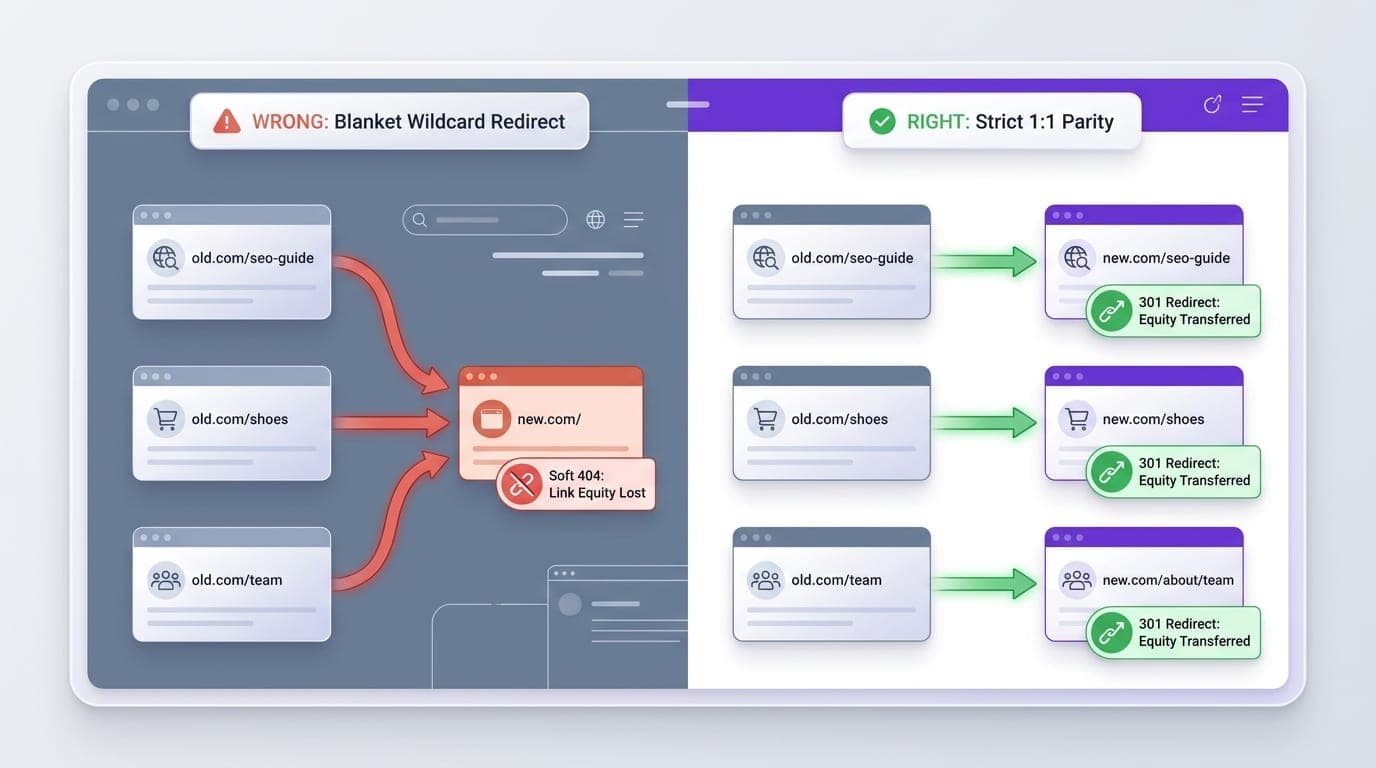
Every legacy URL must resolve to its exact conceptual counterpart on the new architecture using a permanent server redirect. Maintaining this parity preserves both user intent and accumulated authority.
Under IETF RFC 9110 standards, a 301 redirect instructs web crawlers that a resource has moved permanently, ensuring search engines transfer historical link equity to the destination address.
A second major mistake people make is using lazy wildcard rules to redirect deleted subpages to the homepage. Google openly treats indiscriminate homepage redirects as soft 404 errors, erasing your historical rank signals.
Blanket-redirecting deprecated subfolders to the home page is sheer laziness, and search engines will penalize you by discounting your accumulated authority. If a page has no direct equivalent, route it to its immediate parent category.
- Enforce strict 1:1 destination mapping: Pair legacy URLs with the most topical, relevant page on the new domain.
- Prevent redirect chains: Ensure every legacy URL points directly to its final destination in a single hop.
- Standardize trailing slashes: Eliminate duplicate hops caused by mixed slash conventions or uppercase characters.
- Map image and asset paths: Redirect high-ranking PDF resources and high-traffic image assets to prevent 404 losses.
Staging Environment QA: Technical Audits Before Deployment
Your staging site must mirror your intended production architecture perfectly while remaining entirely invisible to public crawlers. One configuration error here can leak pre-launch content or break your live metadata.
Never rely solely on a `Disallow: /` directive in your robots.txt file to block staging. If another website links to your staging URL, Google can index the bare URL without snippet content.
Instead, secure your test environment with HTTP basic authentication. This prevents crawler access while allowing your internal tools to run authenticated parity crawls using login credentials.
Unlike executing a routine basic seo plan, auditing a staging environment requires validating server response headers line by line before pushing code live.
I insist on a strict 72-hour staging code freeze prior to launch, because last-minute styling tweaks invariably break canonical tags. Hold engineering teams accountable to frozen templates.
- Self-referential canonical tags: Verify that canonicals point to production URLs rather than staging hostnames.
- Internal link protocol: Confirm all internal href attributes use relative paths or clean production domains.
- Structured data schema: Test JSON-LD entities to verify that product, organization, and article markup remain intact.
- Meta robots validation: Check that staging does not contain accidental `noindex, nofollow` headers on key templates.
- Core Web Vitals testing: Measure LCP and CLS metrics on new templates to prevent post-launch performance regressions.
Launch Day Sequence: DNS Switches, Sitemaps, and Live Verification
Launch execution succeeds or fails based on timing your DNS propagation and redirect deployment in lockstep. An unordered deployment leaves crawlers landing on broken server configurations.
Begin by reducing your Time to Live (TTL) values across your Cloudflare DNS management records to 300 seconds roughly 48 hours prior to launch. Low TTL settings ensure record updates take effect within minutes.

Once server switches complete, immediately deploy your redirect rules at the server or edge layer. Then lift your HTTP basic authentication blocks to let spiders access your new production pages.
Deploying a site migration on a Friday afternoon is professional negligence. I only schedule DNS cutovers on Tuesday mornings at 6:00 AM, providing an entire business week to address unforeseen issues.
- Execute DNS cutover: Point A-records and CNAMEs to the new production server.
- Verify server response codes: Run command-line `curl -I` tests against legacy URLs to verify 301 headers.
- Submit XML sitemaps: Upload both your legacy URL sitemap and your new XML sitemap to Google Search Console.
- Trigger Change of Address: If changing domains, complete the verification via the Google Search Console Change of Address tool.
- Perform live sanity crawl: Crawl the top 1,000 priority URLs immediately to confirm status code 200 responses.
Post-Launch Diagnostics: Catching Drops and Traffic Recovery
Detecting technical discrepancies within the first forty-eight hours prevents temporary indexation hiccups from turning into permanent search penalties. Spiders begin processing changes the moment DNS records refresh.
Carefully monitor your crawl stats in Google Search Console alongside server access logs. Verify that search engine bots read your updated robots.txt specifications and encounter minimal 5xx server exceptions.
If you observe localized rank drops, audit page title tags, internal link distributions, and canonical destinations first. Missing breadcrumb trails or stripped heading tags often explain sudden declines.
Expect a standard two-to-four-week period of ranking and indexation volatility. Search engines must re-crawl legacy URLs, register the 301 responses, and recalculate ranking scores across the new URL paths.
Panicking and reverting a migration when traffic wobbles in week two is the worst decision a team can make. Search engines require processing time to digest structural changes, so hold steady.
- Daily 404 monitoring: Export 404 response errors from server logs and GSC daily to patch missed redirects.
- Index coverage tracking: Watch the GSC Page Indexing report to verify that new pages replace legacy URLs.
- SERP position validation: Track top revenue queries to identify specific categories suffering ranking losses.
- External link outreach: Reach out to your top ten highest-equity referring domains to request direct link updates.
Once your core infrastructure is stable, programmatically expanding your directory and topical authority with ProgSEO can accelerate organic visibility across your newly migrated domain. Establishing clean page templates early ensures your new site builds sustainable search equity without architectural debt.
Organic traffic volatility typically lasts between two and six weeks following an architectural migration. Search engines must recrawl legacy URLs, process 301 redirects, update their index, and consolidate ranking signals across the new URLs.
Mass redirecting old URLs to your homepage causes Google to treat those redirects as soft 404 errors. This completely strips away the historical page-level link equity and causes your previous organic rankings to collapse.
Verify that canonical tags point to production domains, internal links use clean paths rather than staging subdomains, schema markup remains valid, and no unintended noindex tags or disallow rules exist.
Verify both your legacy and new domains in Google Search Console, implement 301 redirects across all URLs, and use the official Change of Address tool located under Property Settings in Google Search Console.
Sources & References
- Screaming Frog — Desktop site crawling software used for baseline URL extraction and redirect audit verification.
- Google Search Central Site Moves — Official Google developer documentation detailing technical guidelines for site moves with URL changes.
- IETF RFC 9110 — Standards definition for HTTP status codes, including 301 Moved Permanently semantics.
- MDN Web Docs Authentication — Technical guide on HTTP authentication schemes used to protect staging environments from search engines.
- Ahrefs Webmaster Tools — Diagnostic backlink and indexing index used to audit inbound link equity before mapping URLs.
- Google Search Central Change of Address — Official instructions for executing domain change notifications in Google Search Console.
- Cloudflare DNS Documentation — Infrastructure guide on TTL management and DNS record propagation during website migrations.
- Google Robots.txt Specifications — Developer standards for managing crawler directives and indexing behavior.







