The ubersuggest free plan has no monthly cost, while paid tiers depend on higher query volume and multi-domain tracking needs (see the pricing page). I use the free account for occasional spot checks, but its strict caps will challenge any high-velocity workflow. You get basic metrics without recurring invoices, provided you know where the walls sit.
▶ Related Video
10 SEO Tools That Replace Semrush & Ahrefs in 2026
Key Takeaways
- Strict daily search caps. Free accounts receive exactly three keyword or domain searches every 24 hours.
- Limited crawl depth. The built-in technical audit crawls up to 100 pages per domain before stopping.
- Truncated report rows. Keyword and backlink tables display between 10 and 30 results before locking the rest.
- Zero credit card requirement. The perpetual free tier never expires and does not require billing details.
- Global rank tracking boundaries. The platform monitors tracked terms across over 20 locations as of October 2026 on free registrations.
Daily Search Quotas: What You Actually Get Each Day
You receive exactly three daily searches on the free tier once you log in with your credentials. If you visit Ubersuggest anonymously without signing in, you might burn through one or two trial queries before an account creation wall blocks your browser.
In my opinion, limiting searchers to three queries every 24 hours feels intentionally claustrophobic, but it forces ruthless prioritization. Every single domain lookup, competitor analysis, or keyword seed entry counts as one deduction from your balance. The counter resets at midnight based on your local browser timezone.
3
Daily searches allowed
100
Site audit page crawl limit
1
Tracked project allowed
A common mistake people make is burning their three daily searches on broad, single-word seed terms like "marketing." That query yields generic trends you cannot act on. If you pair this account with a basic SEO plan, save your queries for specific long-tail buyer phrases or direct competitor URLs.
Working Features Inside the Unpaid Tier
The free account grants functional access to the keyword ideas report, domain traffic estimates, top SEO pages, and a lightweight technical crawler. You can test seed keywords, inspect search volume graphs, view estimated cost-per-click values, and evaluate paid and organic difficulty ratings on a 1-to-100 scale.
I frequently run the site audit crawl limit of 100 pages to catch baseline crawl hygiene issues on new projects. The tool highlights broken links, checks page title tags, and surfaces HTTP status codes requiring immediate fixes.
- Keyword Overview: Delivers historical search volume, SEO difficulty, and estimated click distribution across devices.
- Keyword Ideas Generator: Surfaces related terms, autocomplete patterns, prepositions, and comparative phrasing.
- Domain Overview: Displays organic keyword counts, estimated monthly traffic volume, and top-ranking target URLs.
- Site Audit Module: Inspects basic technical health, site speed, and title tags up to the 100-page threshold.
- Chrome Extension: Offers supplemental on-SERP query data while you browse Google directly.
My view on this setup is simple: the technical crawler provides genuine diagnostic value for hobby sites, even if large stores outgrow it instantly. It flags fundamental indexation roadblocks outlined in Google Search Central documentation without demanding a paid subscription.

Gated Data, Truncated Rows, and Reporting Limits
Free reports cut off after displaying 10 to 30 rows of data, obscuring the remainder of your keyword or competitor lists behind blurred paywalls. You cannot export complete spreadsheets or review complete historical trends beyond a few months of sampling.
Backlink intelligence suffers the heaviest gating on an unpaid profile. You see top-level referring domain totals, but the platform locks specific source URLs, anchor text distributions, and backlink acquisition velocity charts. Content gap analysis between multiple competing domains is entirely inaccessible without an active license.
| Tool Capability | Ubersuggest Free Plan | Paid Tiers |
|---|---|---|
| Daily Search Quota | 3 searches / 24 hours | 150 to 500+ daily searches |
| Report Rows Shown | 10–30 visible rows | Uncapped or high export rows |
| Site Audit Crawl Depth | 100 pages per crawl | 1,000 to 10,000+ pages |
| Historical Data Range | Recent months only | Multiple years of trends |
| Backlink Row Visibility | Heavy blur, top lines only | Full backlink drill-downs |
I consider the 30-row truncation nearly crippling if your strategy depends on discovering low-competition keyword clusters. You can compare this to evaluating an eRank free plan, where marketplace sellers hit similar wall cutoffs during deep product research.
For foundational organic query data, I recommend pairing this interface with Google Search Console. Search Console provides unblurred search impressions and click data for your verified assets without query metering.
Perpetual Free Account vs. the 7-Day Free Trial
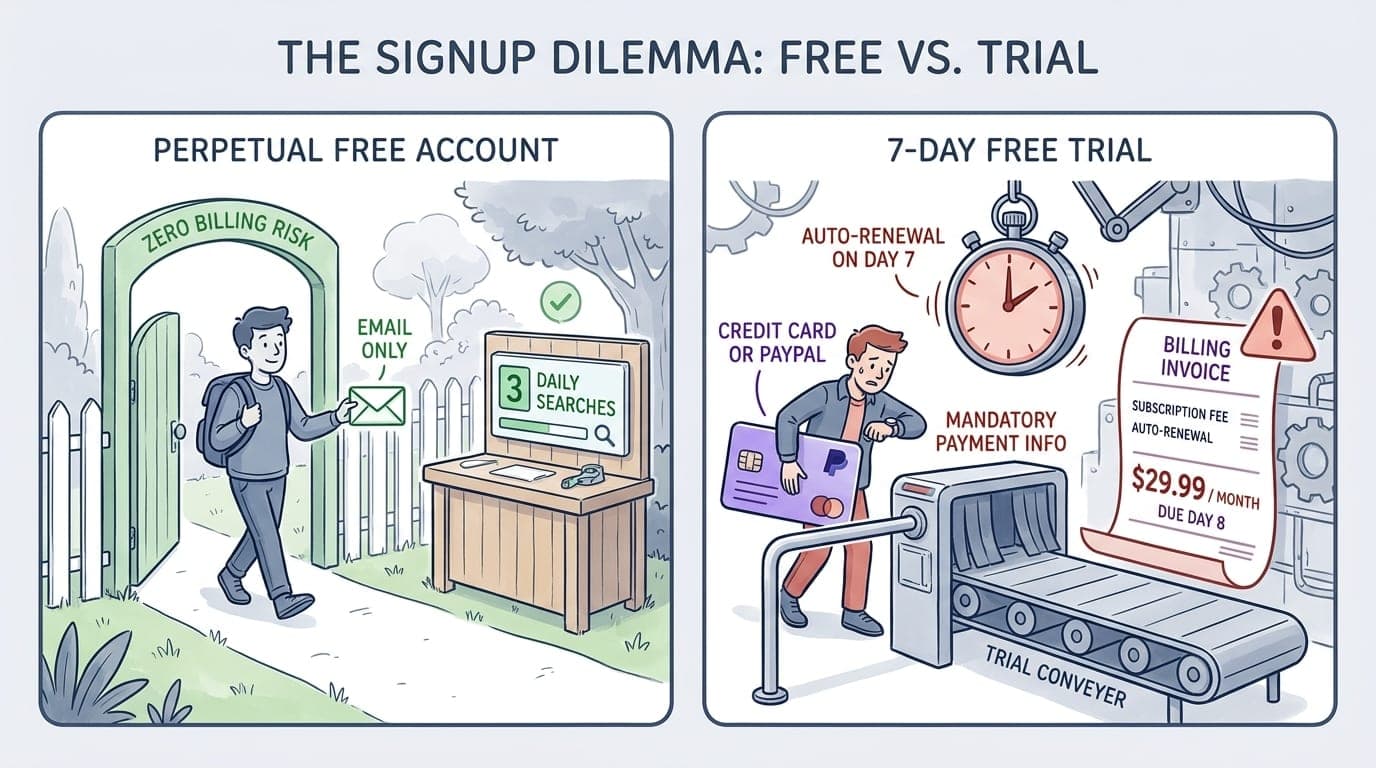
The perpetual free plan requires only an email address, whereas the 7-day free trial mandates entering a valid credit card or PayPal account to unlock premium tiers. Many searchers confuse these two options when navigating the onboarding flow.
A second frequent mistake occurs when users sign up for the 7-day trial expecting it to downgrade automatically into the unpaid account without consequences. If you forget to cancel before day seven ends, the billing engine charges you for an annual or monthly plan immediately.
“The perpetual free tier never asks for a credit card. If an onboarding screen demands payment details, you are entering a trial of a paid plan rather than using the free tier.”
- SEO Practitioner Rule
In my view, gating the full-featured trial behind an automatic payment renewal model is an aggressive conversion tactic. If you want zero financial risk, bypass the trial prompts and stick strictly to the logged-in freemium dashboard.
Decision Thresholds: When the Free Plan Stops Working
You outgrow the free tier the moment your website contains more than 100 indexable pages or your content schedule demands multi-angle keyword research. Scraping together three search queries per day wastes valuable billable time when managing client deliverables.
- Exceeding 100 URLs: Your technical audit fails to crawl deeper architecture, leaving orphaned URLs and pagination issues unnoticed.
- Batch Content Production: Building comprehensive topic clusters requires analyzing dozens of related terms in single sittings.
- Competitor Gap Audits: Uncovering where rivals earn organic traction requires full table exports rather than 10 preview rows.
- Multi-Domain Monitoring: Managing multiple client domains requires separate project tracking configurations.
- Link Outreach Campaigns: Finding lost links or prospect anchors requires comprehensive backlink profile exploration.
When evaluating content expansion tools, review how platforms compare for automated tasks. You can examine ProgSEO vs Ubersuggest for SaaS content generation or ProgSEO vs Ubersuggest for SaaS AI article writing to see how manual research balances against programmatic publishing systems.
To scale your organic footprint beyond manual three-query research, ProgSEO automates high-intent page generation using structured website data. This approach lets growing businesses expand search coverage without spending days assembling fragmented keyword spreadsheets.
You receive three free searches every 24 hours. The quota applies across all domain overviews, competitor checks, and keyword idea reports, resetting daily at midnight.
The free version blocks historical traffic graphs beyond a few months, truncates keyword and backlink tables to 10–30 rows, caps audits at 100 pages, and locks competitive gap analysis.
Ubersuggest offers a perpetual free tier that never expires and requires no credit card. The 7-day trial is a separate option that unlocks paid features but auto-bills if not canceled.
Yes, creating an account or logging in with Google is required to get the standard three daily searches. Unregistered visitors are quickly blocked by sign-up prompts.
Sources & References
- Ubersuggest Free Trial Details — official documentation detailing plan allowances, trial billing conditions, and rank tracking coverage across over 20 locations as of October 2026.
- Ubersuggest Main Platform — core portal providing keyword ideas, domain analysis, and technical site audit overviews.
- MDN Web Docs: HTTP Status Codes — technical documentation outlining crawl response headers and status codes detected during site audits.
- Google Search Central Crawling & Indexing — official search guidelines on crawl budgets, architecture hygiene, and URL indexing thresholds.
- Google Search Console — primary webmaster tool providing unmetered performance analytics and search impression metrics.







