When most website owners and digital marketers think about search engine optimization (SEO), their minds immediately jump to acquiring backlinks from external websites. While earning high-quality external links is undeniably crucial for building domain authority, this relentless external focus often leads to the neglect of a powerful, entirely controllable, and highly effective SEO asset right at your fingertips: your internal links.
Welcome to the ultimate Internal Linking Strategy Guide. In this comprehensive resource, we will explore how connecting the pages of your own website can dramatically boost your search rankings, enhance user experience, and drive conversions. Whether you are managing a small blog, a growing SaaS platform, or a massive e-commerce empire, mastering the art of connecting your content is a non-negotiable pillar of SEO success.
Understanding the Basics: What Are Internal Links?
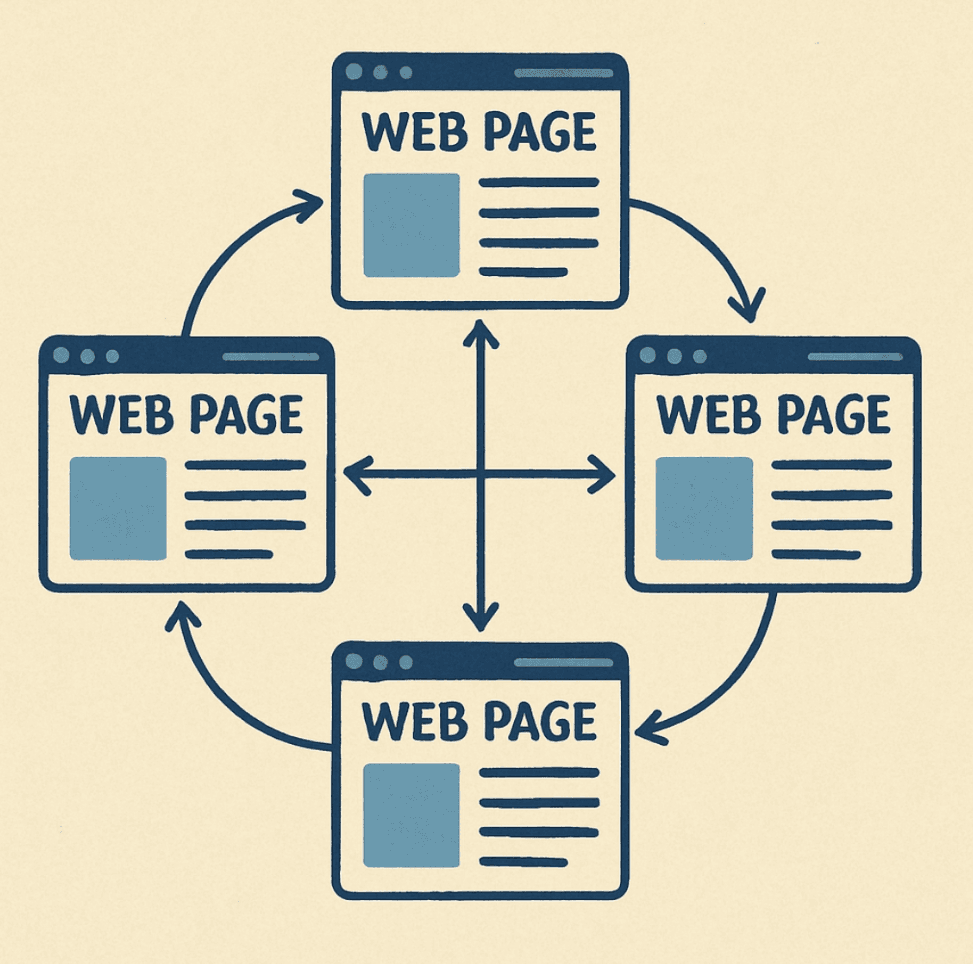
An internal link is simply a hyperlink that points from one page on a domain to a different page on that same domain. If you link from your homepage to your "About Us" page, you have created an internal link.
To fully grasp their importance, we must first look at the difference between internal vs external links. External links (also known as outbound links when you link out, or backlinks when others link to you) connect two entirely different websites. They act as votes of confidence from one site to another. Internal links, however, are the pathways within your own digital property. They dictate how both human visitors and search engine crawlers navigate your website.
To fully grasp their importance, we must first look at the difference between internal vs external links. External links (also known as outbound links when you link out, or backlinks when others link to you) connect two entirely different websites. They act as votes of confidence from one site to another. Internal links, however, are the pathways within your own digital property. They dictate how both human visitors and search engine crawlers navigate your website.
Why Do Internal Links Matter?
Implementing a solid framework for your links goes far beyond just keeping visitors on your site longer. It is a fundamental component of technical and on-page SEO. Here is why you need to optimize internal links meticulously:
- Improving Website Crawlability: Search engines like Google use automated bots (spiders) to discover and index content. These bots rely heavily on links to navigate the web. If your pages are tightly interwoven, you are significantly improving website crawlability, ensuring that Google finds, crawls, and indexes all your valuable content efficiently.
- Distributing Link Equity: When a page on your site earns a powerful external backlink, that specific page gains authority (often referred to as PageRank). A well-planned internal network allows you to engage in strategic link juice distribution, funneling that earned authority from high-performing pages to other important pages that need a ranking boost.
- Enhancing User Experience: Links guide users to the information they need, answering their subsequent questions before they even have to ask them.
- Establishing Information Hierarchy: Internal links tell search engines which pages on your site are the most important. A page with hundreds of internal links pointing to it is signaled to Google as a highly valuable piece of cornerstone content.
The Foundation: Optimizing Site Architecture for Search
Before you can dive into the granular details of linking individual blog posts, you must look at the macro picture. The overall framework of your website dictates how easily authority flows through it. Optimizing site architecture for search is the bedrock upon which your entire SEO strategy rests.
Building a Logical Internal Link Structure
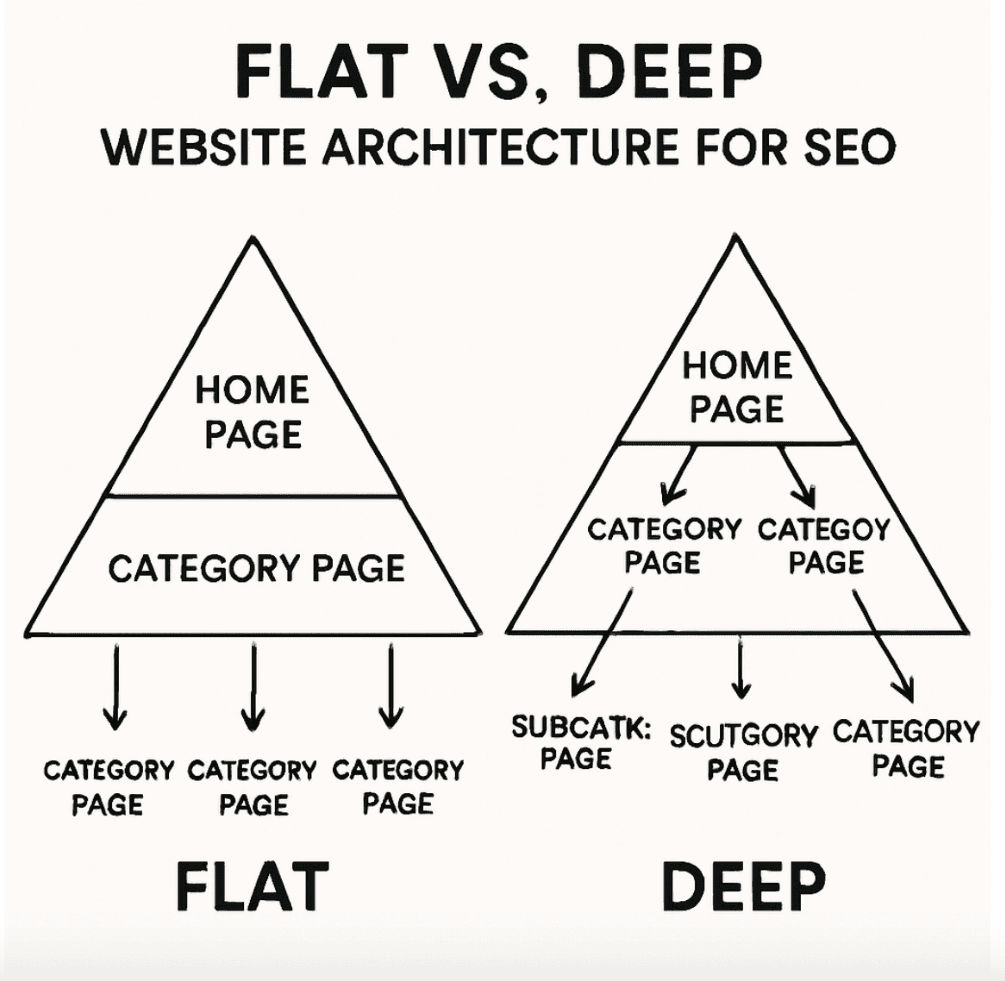
Your internal link structure should ideally resemble a pyramid. At the top is your homepage. Below that are your main category pages or pillar pages. Below those are subcategories, and finally, individual product pages or blog posts.
This hierarchical approach ensures that no page on your site is more than three or four clicks away from the homepage. A shallow site architecture prevents authority from being diluted as it travels deep into your site, ensuring that even your newest content receives a baseline level of link equity.
This hierarchical approach ensures that no page on your site is more than three or four clicks away from the homepage. A shallow site architecture prevents authority from being diluted as it travels deep into your site, ensuring that even your newest content receives a baseline level of link equity.
Navigational vs. Contextual Links
To truly master your architecture, you need to understand the distinct roles that different types of links play. Broadly speaking, there is a clear distinction between informational vs navigational links.
- Navigational Links: These are the structural links that help users find their way around the site. They are typically located in your header menu, footer, and sidebar. They signal the overarching structure of your business or content.
- Informational/Contextual Links: These are links embedded directly within the main body text of a page. They provide additional information, context, or resources related to the specific topic being discussed.
While both are important, search engines tend to give more weight to contextual links because they are surrounded by relevant text, providing strong semantic signals about the linked page's content.
The Power of Breadcrumb Navigation SEO
One of the most overlooked elements of site architecture is breadcrumbs. Breadcrumbs are the small text paths (e.g., Home > Men's Clothing > Shoes > Sneakers) usually located at the top of a page.
Breadcrumb navigation SEO is incredibly powerful for three reasons:
Breadcrumb navigation SEO is incredibly powerful for three reasons:
- It provides users with an instant understanding of where they are within your site hierarchy.
- It allows users to easily jump back to broader category pages.
- It automatically creates a consistent, logical internal linking structure that feeds keyword-rich anchor text back up to your higher-level category pages.
If you are running an e-commerce site or a large content portal, enabling and optimizing breadcrumbs via schema markup is an absolute must.
Advanced Strategies: Silos and Topic Clusters
Once your foundational architecture is sound, it is time to organize your content thematically. Search engines have evolved to understand context and semantic relationships. They no longer rank sites based on single keywords; they rank sites based on topical authority.
Implementing a Silo Structure for SEO
A silo structure for SEO involves grouping related content into distinct, separated categories (silos) within your site.
Imagine you run a fitness website. You might have one silo dedicated to "Weightlifting," another to "Cardio," and a third to "Nutrition." In a strict silo structure, pages within the "Weightlifting" silo link frequently to each other and up to the main "Weightlifting" category page. However, they rarely link to pages in the "Nutrition" silo.
This disciplined approach ensures that relevance and topical authority are tightly contained and concentrated. When Google crawls the "Weightlifting" silo, it receives an overwhelming number of signals that this section of the site is deeply authoritative on that specific subject.
Imagine you run a fitness website. You might have one silo dedicated to "Weightlifting," another to "Cardio," and a third to "Nutrition." In a strict silo structure, pages within the "Weightlifting" silo link frequently to each other and up to the main "Weightlifting" category page. However, they rarely link to pages in the "Nutrition" silo.
This disciplined approach ensures that relevance and topical authority are tightly contained and concentrated. When Google crawls the "Weightlifting" silo, it receives an overwhelming number of signals that this section of the site is deeply authoritative on that specific subject.
Topic Clusters and Internal Linking
A slightly more modern, flexible variation of the silo is the topic cluster model. Topic clusters and internal linking go hand-in-hand to build monumental topical authority.
The topic cluster model consists of three components:
The topic cluster model consists of three components:
- The Pillar Page: A comprehensive, broad overview of a core topic (e.g., "The Ultimate Guide to Digital Marketing").
- Cluster Content: Deep-dive articles that cover specific subtopics related to the pillar (e.g., "Social Media Strategies," "Email Marketing Automation," "SEO Basics").
- Internal Links: The glue that holds the cluster together. Every piece of cluster content must link back to the pillar page, and the pillar page should link out to the cluster content.
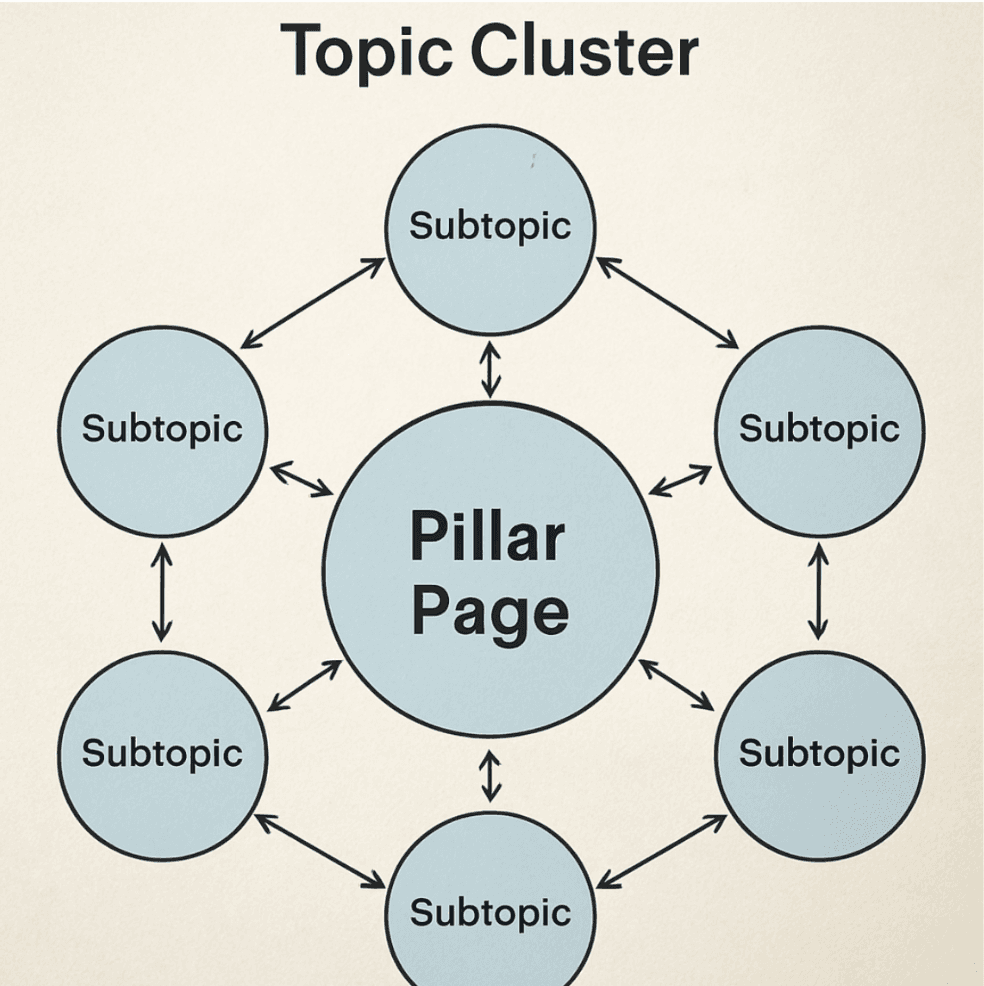
This hub-and-spoke model signals to search engines that your pillar page is the definitive resource on the topic, supported by a wealth of in-depth subtopic content. When one piece of cluster content performs well and attracts external backlinks, the internal links ensure that the rising tide lifts all the boats within that specific cluster.
The Art of the Link: Placement and Anchor Text
Having a great structure is only half the battle. The actual implementation of your links---where you put them and what words you use to create them---can make or break your strategy.
Contextual Link Placement
As mentioned earlier, links placed within the main body of your content carry the most SEO weight. However, contextual link placement requires a strategic mindset.
Search engines employ a "Reasonable Surfer" model, which hypothesizes that the likelihood of a user clicking a link depends on its placement, visibility, and relevance. A link placed high up in the introduction of an article is far more likely to be clicked than a link buried in the final paragraph. Therefore, Google passes more value through links placed higher up in the main content area.
When executing your strategy, aim to place your most important internal links early in the content where they provide the most immediate value to the reader.
Search engines employ a "Reasonable Surfer" model, which hypothesizes that the likelihood of a user clicking a link depends on its placement, visibility, and relevance. A link placed high up in the introduction of an article is far more likely to be clicked than a link buried in the final paragraph. Therefore, Google passes more value through links placed higher up in the main content area.
When executing your strategy, aim to place your most important internal links early in the content where they provide the most immediate value to the reader.
Anchor Text Optimization
Anchor text is the clickable, visible text in a hyperlink. For search engines, anchor text provides vital context about the destination page. Anchor text optimization is a critical skill for any SEO professional.
When it comes to external backlinks, using too much "exact match" anchor text (e.g., 100 websites linking to you using the exact phrase "buy cheap shoes") can trigger spam penalties. However, internal linking rules are different. Because you own the site, Google expects you to use descriptive, keyword-rich anchor text.
Here are the best practices for internal anchor text:
When it comes to external backlinks, using too much "exact match" anchor text (e.g., 100 websites linking to you using the exact phrase "buy cheap shoes") can trigger spam penalties. However, internal linking rules are different. Because you own the site, Google expects you to use descriptive, keyword-rich anchor text.
Here are the best practices for internal anchor text:
- Be Descriptive: The user and the search engine should know exactly what the destination page is about before clicking.
- Vary Your Anchors: While you won't get penalized for exact match internal links, it is still best practice to use variations to capture a wider net of semantic search terms. If your target page is about "Dog Training Tips," use anchors like "training your dog," "puppy obedience tips," and "how to train a dog."
- Avoid Generic Phrases: Never use "click here," "read more," or "this article" as anchor text. These provide zero context to search engines and waste a valuable opportunity to pass keyword relevance.
- Keep it Natural: Above all, the anchor text must flow naturally within the sentence. Do not force awkward phrasing just to insert a keyword.
Strategic Execution: Distributing Authority and Mapping Journeys
Linking is not a random act; it is a deliberate exercise in guiding both authority and human behavior.
Mastering Link Juice Distribution
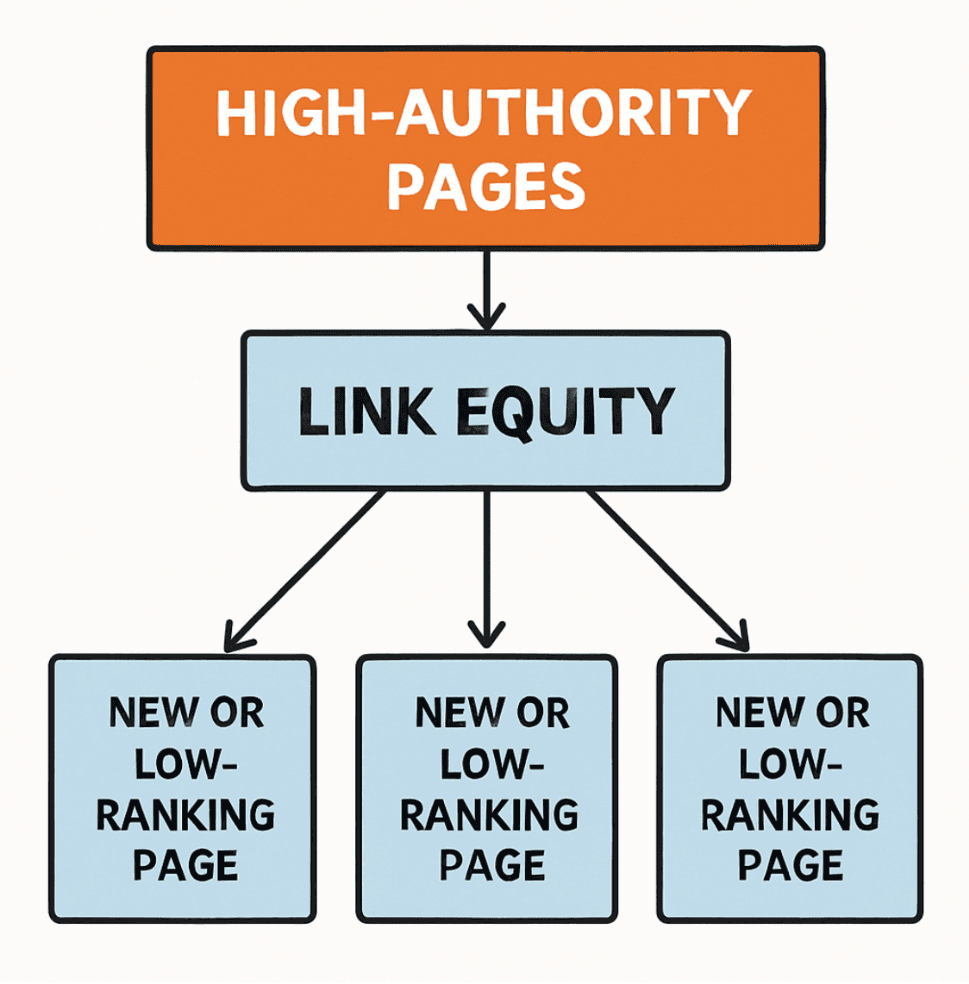
To maximize your SEO efforts, you must understand how to maneuver link equity throughout your site. This process of distributing link equity involves identifying your "power pages"---the pages on your site that have accumulated the most external backlinks and authority.
You can find these power pages using SEO tools like Ahrefs, Semrush, or Google Search Console. Once identified, your goal is to edit these high-authority pages and add internal links pointing to your most important, high-converting pages (often referred to as "money pages") that need a ranking boost.
By doing this, you act as a digital traffic cop, directing the flow of authority away from older, informational blog posts and toward the product pages or service pages that actually drive revenue for your business.
You can find these power pages using SEO tools like Ahrefs, Semrush, or Google Search Console. Once identified, your goal is to edit these high-authority pages and add internal links pointing to your most important, high-converting pages (often referred to as "money pages") that need a ranking boost.
By doing this, you act as a digital traffic cop, directing the flow of authority away from older, informational blog posts and toward the product pages or service pages that actually drive revenue for your business.
Mapping User Journey with Links
While SEOs often get caught up in link juice and crawlers, we must never forget the human element. The best seo internal links are those that genuinely help the user.
Mapping user journey with links involves understanding the stages of your customer's lifecycle: Awareness, Consideration, and Decision.
Mapping user journey with links involves understanding the stages of your customer's lifecycle: Awareness, Consideration, and Decision.
- Awareness Stage: A user reading a high-level blog post about "What is CRM?" should be internally linked to mid-funnel content like "Benefits of CRM for Small Business."
- Consideration Stage: The mid-funnel content should then internally link to bottom-funnel content, such as "Comparing Top CRM Software" or a specific feature page.
- Decision Stage: Finally, the bottom-funnel content should link to a pricing page, a demo request, or a contact form.
By aligning your internal links with the buyer's journey, you naturally guide visitors down the sales funnel, dramatically increasing your site's conversion rate alongside its SEO performance.
The Technical Side: How to Audit Internal Links
Even the most meticulously planned website will develop linking issues over time as content is added, deleted, or moved. Regular maintenance is required to keep your site architecture healthy. Knowing how to audit internal links is a critical skill.
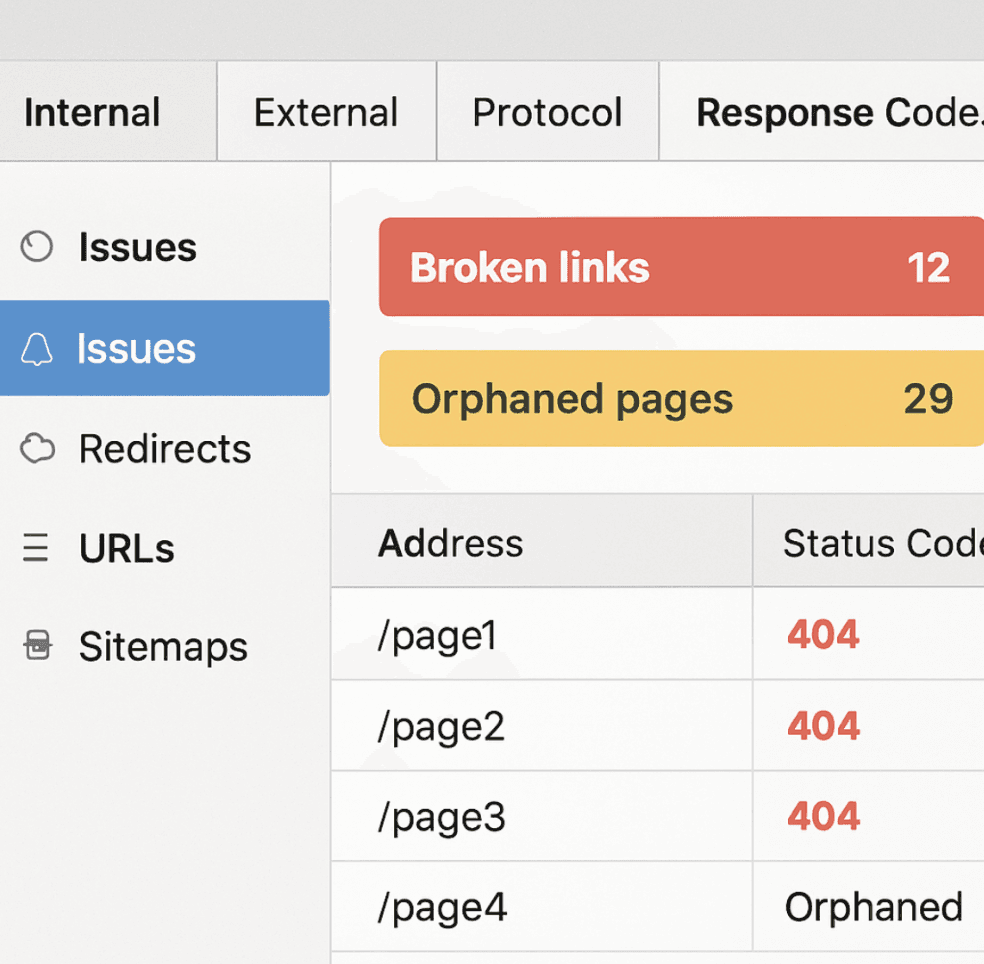
To perform a comprehensive audit, you will need a site crawler tool like Screaming Frog SEO Spider, Sitebulb, or Ahrefs Site Audit. These tools simulate Googlebot, crawling your entire site and reporting on its architecture and linking health.
To perform a comprehensive audit, you will need a site crawler tool like Screaming Frog SEO Spider, Sitebulb, or Ahrefs Site Audit. These tools simulate Googlebot, crawling your entire site and reporting on its architecture and linking health.
Step 1: Fix Broken Internal Links (404s)
The most common and detrimental issue you will find during an audit is broken internal links. These occur when you link to a page that has been deleted or its URL has been changed without a proper 301 redirect.
Broken links create a frustrating user experience and waste valuable crawl budget. Search engines hit a dead end, and the link equity that was supposed to flow to the destination page is completely lost. Your audit tool will highlight these 404 errors; your job is to go into the source pages and either update the link to the correct URL or remove the link entirely.
Broken links create a frustrating user experience and waste valuable crawl budget. Search engines hit a dead end, and the link equity that was supposed to flow to the destination page is completely lost. Your audit tool will highlight these 404 errors; your job is to go into the source pages and either update the link to the correct URL or remove the link entirely.
Step 2: Identifying Orphaned Pages
An orphaned page is a page on your website that has absolutely zero internal links pointing to it. Identifying orphaned pages is crucial because if you don't link to a page, human users cannot navigate to it, and search engines have a very hard time discovering or indexing it. Furthermore, because the page receives no internal link equity, its chances of ranking in search engine results pages (SERPs) are practically zero.
When your crawler identifies orphaned pages, you have two choices:
When your crawler identifies orphaned pages, you have two choices:
- If the page is valuable and should be ranking, find relevant places on your site to add internal links pointing to it.
- If the page is outdated, useless, or a duplicate, either delete it (and let it 404) or redirect it to a relevant, active page.
Step 3: Assessing Click Depth
As mentioned during the site architecture section, pages buried deep within your site struggle to rank. Your crawler will provide a "click depth" or "crawl depth" metric for every page.
Filter your audit report to find important pages that have a click depth of 4 or higher (meaning it takes at least 4 clicks from the homepage to reach them). To fix this, you need to flatten the architecture. You can do this by adding links to these deep pages from higher-level category pages, or by linking to them from popular, low-click-depth blog posts.
Filter your audit report to find important pages that have a click depth of 4 or higher (meaning it takes at least 4 clicks from the homepage to reach them). To fix this, you need to flatten the architecture. You can do this by adding links to these deep pages from higher-level category pages, or by linking to them from popular, low-click-depth blog posts.
Step 4: Finding Redirect Chains
Sometimes, an internal link points to Page A, but Page A redirects to Page B, which redirects to Page C. This is known as a redirect chain. Redirect chains slow down page load times and dilute link equity at every step of the chain. Use your audit tool to identify these chains and update the original internal link so that it points directly to the final destination (Page C).
Leveraging Technology: Automated Internal Linking Tools
As your website grows to hundreds or thousands of pages, manually remembering every piece of content and identifying internal linking opportunities becomes humanly impossible. This is where technology steps in.
The market has seen a rise in automated internal linking tools and WordPress plugins designed to streamline this process. Tools like Link Whisper, Internal Link Juicer, and InLinks use natural language processing (NLP) to analyze your content and suggest relevant internal linking opportunities automatically.
The market has seen a rise in automated internal linking tools and WordPress plugins designed to streamline this process. Tools like Link Whisper, Internal Link Juicer, and InLinks use natural language processing (NLP) to analyze your content and suggest relevant internal linking opportunities automatically.
The Pros of Automated Tools
- Speed and Efficiency: What would take days of manual auditing and searching can be accomplished in minutes. These tools can scan your entire database and suggest dozens of relevant links with a single click.
- Uncovering Hidden Opportunities: Automated tools are excellent at finding older, forgotten articles that are highly relevant to the new content you just published.
- Orphan Page Management: Many of these tools have built-in dashboards that instantly flag orphaned pages, allowing you to quickly inject links to them.
The Cons and Cautions
- Lack of Context: While NLP is improving, automated tools do not possess human nuance. They might suggest a link based on matching keywords, but the actual context of the sentence might make the link irrelevant or confusing to a human reader.
- Over-Optimization: Relying too heavily on automation can lead to a bloated, unnatural linking profile where every possible keyword is hyperlinked, which looks spammy to both users and search engines.
The Verdict: Automated tools are fantastic for discovery and scaling your efforts, but they should never run completely on autopilot. Use them to generate suggestions, but always have a human editor review and approve the optimize internal links recommendations to ensure contextual relevance and natural phrasing.
Creating a Sustainable Link Building Strategy for Internal Pages
Building a successful internal link network is not a one-time project; it is an ongoing process that must be integrated into your overall content creation and SEO workflow. Here is how to build a sustainable link building strategy for your internal pages.
1. Document Your Pillar Pages
Create a spreadsheet documenting your most important pillar pages and "money pages." These are the pages you ultimately want to rank in search engines and drive revenue. Whenever you create new content, refer to this list and ask yourself, "Which of these pillar pages is relevant to the article I am writing today?"
2. The "New to Old" and "Old to New" Habit
Every time you publish a new blog post, you should perform two critical tasks:
- New to Old: Ensure the new article includes at least 3 to 5 internal links pointing to older, relevant pillar pages or cluster content.
- Old to New: This is the step most people forget. Go to Google and use the site search operator (site:yourdomain.com "keyword") to find old articles on your site that mention the topic of your newly published post. Go into those old articles and add an internal link pointing to the new post. This gives your new content an immediate injection of link equity and helps it index faster.
3. Implement an Internal Linking Checklist for Editors
If you have a team of writers or editors, create a standard operating procedure (SOP). Do not allow any piece of content to be published unless it meets specific seo internal links criteria. For example:
- Does it link to the parent category page?
- Does it link to at least two related blog posts?
- Is the anchor text descriptive and natural?
- Are the links placed contextually within the body copy?
Top 10 Internal Linking Best Practices and Pro Tips
To summarize the vast amount of information in this Internal Linking Strategy Guide, here is a rapid-fire list of linking best practices and actionable internal linking tips you can apply today:
- Link Deep: Avoid linking exclusively to your homepage or contact page. These pages already get enough links naturally. Focus your internal links deep into your site's architecture to your blog posts, product pages, and specific service offerings.
- Keep Links Relevant: Never link just for the sake of linking. The destination page must provide supplementary value to the topic currently being discussed. Irrelevant links confuse users and dilute topical authority.
- Use Dofollow Links Internally: By default, standard hyperlinks are "dofollow," meaning they pass link equity. Never use "nofollow" attributes on your internal links unless you are linking to restricted pages (like a login page) that you explicitly do not want search engines to crawl or index.
- Limit the Number of Links per Page: While Google no longer enforces a strict limit of 100 links per page, stuffing a page with hundreds of internal links dilutes the value of each individual link. Only include links that are necessary and helpful.
- Open in Same Tab vs. New Tab: As a general UX rule, internal links should open in the same tab, allowing users to navigate your site naturally using their browser's back button. External links should open in a new tab so users do not lose their place on your site.
- Prioritize the First Link: If you link to the same destination page twice within a single article, Google historically only counts the anchor text of the first link. Make sure your most optimized, relevant anchor text is used the first time you link to a page.
- Optimize Images as Links: If you use an image to link to another internal page (such as a banner or a button), search engines use the image's "Alt Text" as the anchor text. Always ensure your linked images have descriptive, keyword-optimized alt text.
- Avoid Mega-Menu Bloat: While large dropdown menus (mega-menus) are great for user navigation on massive e-commerce sites, they inject hundreds of navigational links onto every single page. This can severely flatten your site architecture and dilute the value of your contextual links. Use them sparingly and strategically.
- Monitor Your Most Linked Pages: Regularly check Google Search Console (under "Links" > "Internal links") to see which pages on your site have the most internal links pointing to them. If a low-value page (like a privacy policy) has more internal links than your core product page, you need to adjust your site architecture.
- Regularly Prune and Update: Content decays over time. Make it a habit to revisit old blog posts once a year. Update the information, fix any broken links, and add new internal links pointing to content you have published since the article was originally written.
Frequently Asked Questions (FAQ)
Internal linking is crucial for enhancing website navigation, distributing link equity, and improving search engine crawlability, which can lead to better rankings and user experience.
You can optimize internal links by ensuring they are contextually relevant, using descriptive anchor text, and maintaining a logical site structure that enhances user navigation.
Common mistakes include using generic anchor text, having too many internal links on a page, neglecting orphaned pages, and failing to update links when content changes.
Automated internal linking tools analyze your content and suggest relevant internal linking opportunities based on keyword relevance and page authority.
Yes, you can use tools like the one available at https://www.progseo.dev/tools/internal-linking-tool to simplify and optimize your internal linking strategy.
Conclusion: Tying It All Together
Achieving SEO success is rarely about finding a magic bullet or a secret hack. It is about executing the fundamentals with precision, consistency, and a deep understanding of how search engines and human users interact with your digital property.
As we have explored in this Internal Linking Strategy Guide, the way you connect your content is just as important as the content itself. By consciously optimizing site architecture for search, implementing logical topic clusters and internal linking, mastering anchor text optimization, and strategically distributing link equity, you take absolute control over your website's SEO destiny.
Do not let the obsession with external backlinks blind you to the power you already hold. Start auditing your site today, implement these internal linking tips, and watch as your seo internal links transform your website into a highly crawlable, authoritative, and user-friendly powerhouse that dominates the search engine results pages.
As we have explored in this Internal Linking Strategy Guide, the way you connect your content is just as important as the content itself. By consciously optimizing site architecture for search, implementing logical topic clusters and internal linking, mastering anchor text optimization, and strategically distributing link equity, you take absolute control over your website's SEO destiny.
Do not let the obsession with external backlinks blind you to the power you already hold. Start auditing your site today, implement these internal linking tips, and watch as your seo internal links transform your website into a highly crawlable, authoritative, and user-friendly powerhouse that dominates the search engine results pages.

Aziz J.
Co-founder @ ProgSEO.dev
Written By
Aziz is building ProgSEO.dev, a platform focused on automating SEO content production. He focuses on turning SEO into a system that consistently generates and updates content without manual workflows. Focused on building scalable SEO systems for SaaS and professional services.







