You spend hours writing the perfect article, but months later, it has zero views. The problem might not be your writing; your website could be unintentionally hiding that content. In practice, search engines use automated bots—called "crawlers"—to travel between pages using hyperlinks. If your new post lacks a clear path pointing to it, these bots cannot find it.
Think of your website as a massive library. According to basic search engine mechanics, the 'Discovery' principle of SEO dictates that web pages must be physically connected to be found and ranked. While external links attract visitors from other websites, applying targeted internal linking SEO provides the essential map that helps both human readers and digital crawlers navigate your own rooms.
Mastering this structure doesn't require advanced coding knowledge. By applying the best internal linking practices, you can easily build digital doorways between your posts. This strategic shift ensures your high-quality work finally gets the visibility it deserves.
Digital Votes and Doorways: How Links Pass Authority to Your Top Pages
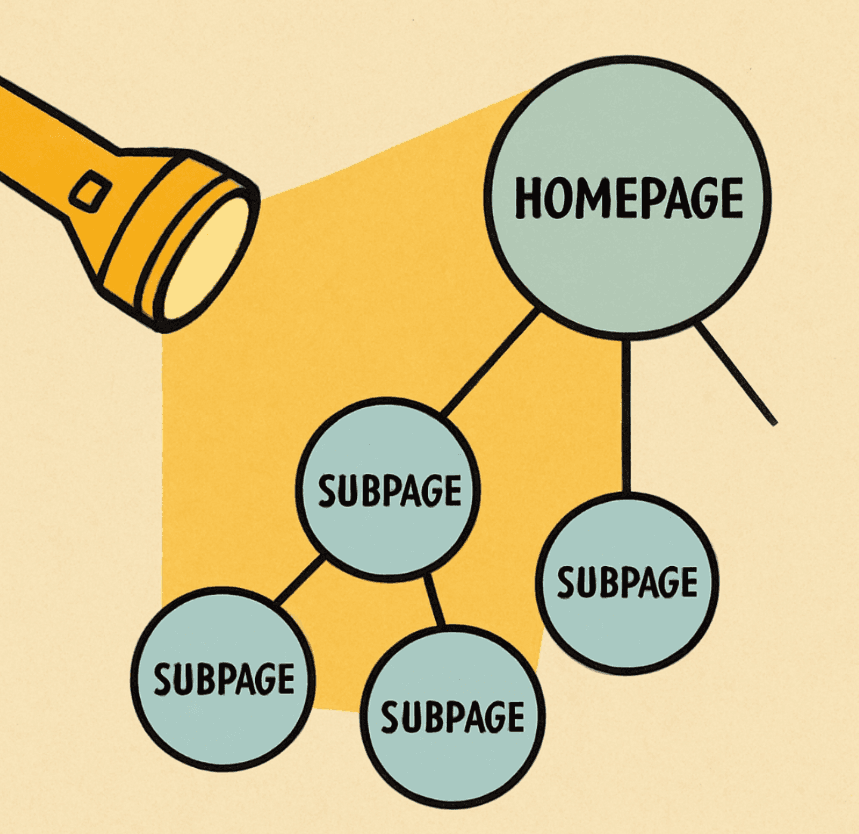
Imagine your homepage is a powerful flashlight in a dark room. Every time you hyperlink to another page, you shine a beam of light onto a new topic, making it visible to Google. This transfer of authority is the foundation of SEO link building, acting as digital votes that tell search engines which articles matter most.
The more closely a page connects to that main light source, the brighter it shines in search results. However, you must carefully manage the distribution of page link equity. If you point that single flashlight at fifty different pages at once, the beam becomes too weak to help any of them stand out.
Where you build these doorways also changes how search engines value them. When comparing navigational links vs contextual links, location changes everything. Navigational links live in your main menu or footer, acting as a static roadmap for basic site structure. Contextual links, on the other hand, sit directly inside the flowing paragraphs of your content.
Because contextual links are surrounded by related thoughts and sentences, Google gives them much more weight than a standard menu button. They act as natural recommendations within your writing, guiding readers deeper into your site. Yet, to make these recommendations truly powerful, the actual words you choose to hyperlink need a serious upgrade.
Stop Using 'Click Here': Mastering Descriptive Anchor Text for Readers and Google
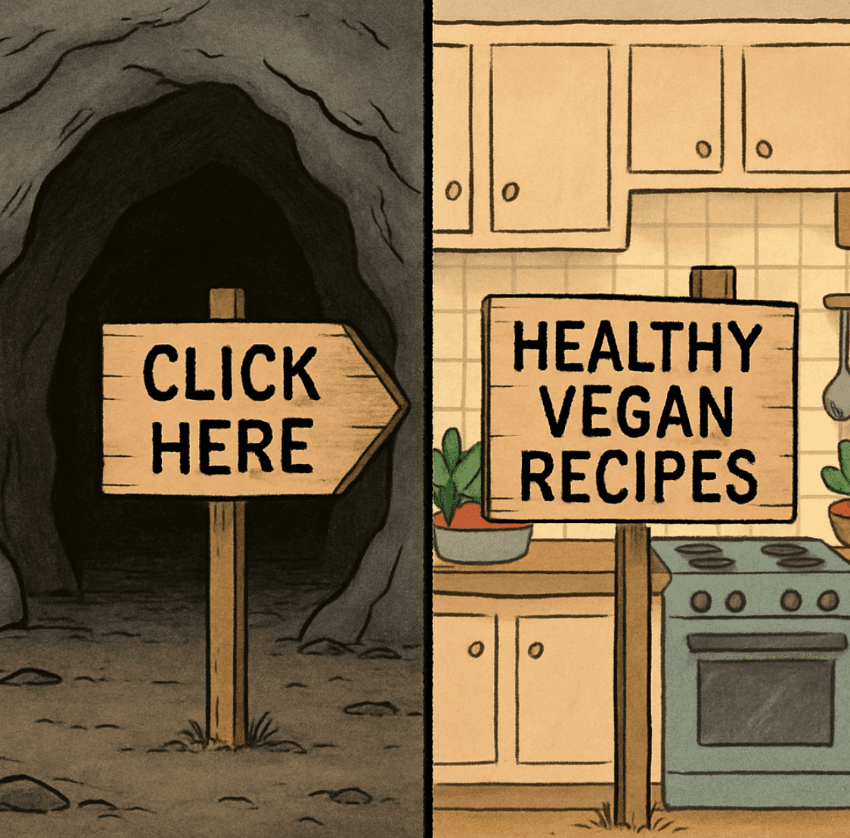
Imagine driving down a highway and seeing an exit sign that just says, "Go Here." You would never turn because you have no idea what awaits. In the digital world, the clickable words you highlight—known as anchor text—act as your website's signposts. Using vague phrases leaves readers lost, which is why learning how to use descriptive anchor text is vital for upgrading your site.
- Poor: Click here for our baking guide. / Descriptive: Read our beginner sourdough baking guide.
- Poor: Learn more about our services. / Descriptive: Explore our residential plumbing services.
- Poor: Get the plan here. / Descriptive: Download the 30-day beginner workout plan.
Industry experts emphasize this heavily, as seen in Google Search Central guidance on crawlable links and Moz’s overview of internal links. When you write clear labels, you tell search crawlers exactly what the destination page is about. Just remember to avoid "keyword stuffing"—keep the text conversational rather than awkwardly cramming in robotic search terms.
Providing accurate context ensures your visitors confidently step through the doorways you build. Once you master these individual signposts, you must zoom out to see how all those pathways connect together to form a broader site architecture.
The 'Hub and Spoke' Blueprint: Organizing Your Website Like a Library
Have you ever walked into a massive library where the books were scattered completely at random? You would never find what you needed, and neither will search engines if your website lacks a clear SEO site architecture strategy. Instead of publishing random articles, imagine your site as a well-organized library using a "Hub and Spoke" layout. The "Hub" is your main, comprehensive guide on a broad topic, while the "Spokes" are smaller, highly specific articles that naturally link back to that main guide.
Grouping these related topics together creates what experts call a silo. One of the biggest benefits of a website silo structure is that it keeps your "link equity"—or digital authority—focused within a specific subject area. When your smaller articles constantly point back to the main hub, you signal to Google that your site is a deep, trusted resource on that exact topic, rather than a messy junk drawer of unrelated thoughts.
Putting this theory into practice requires a simple system for creating a pillar page and cluster model out of your existing content. Follow this four-step workflow to properly organize your ideas:
- Choose a broad, comprehensive topic for your main hub (e.g., "The Ultimate Guide to Gardening").
- Write specific, targeted spoke articles (e.g., "How to Grow Tomatoes," "Best Soil for Roses").
- Add descriptive links from every spoke pointing back up to the main hub.
- Link the individual spokes to each other when they share naturally relevant details.
Providing clear pathways between these groups ensures readers never hit a dead end, especially when using breadcrumbs for better site navigation. These are the small text trails often found at the top of a page (like Home > Gardening > Tomatoes) that give visitors a one-click route back to your broader categories. Even with the best organization system in place, some articles inevitably slip through the cracks and become disconnected from your hubs.
Rescuing Your 'Ghost Pages': How to Fix Orphaned Content and Improve Crawl Depth
The culprit behind zero-view content is often an "orphan page"—an article with absolutely no other pages linking to it. Imagine building a beautiful room in your house but forgetting the door. Identifying and fixing orphan pages is crucial because without these digital doorways, visitors and search engines simply cannot enter.
Managing this visibility requires checking your "crawl depth," which simply means counting how many clicks it takes to reach a page from your homepage. A reliable standard for improving website crawl depth for Googlebot is keeping all important pages within three clicks. Any deeper, and they fade into the background. These disconnected pages typically hide in three common places:
- Old blog posts buried by years of newer updates.
- Deep product categories missing from your main navigation menu.
- Unlinked service pages created during past website redesigns.
Rescuing these stranded assets requires an audit of your internal link health. If you need a quick, practical way to uncover gaps and plan new connections, try our Internal Linking Tool. To prevent future ghost pages, a proactive approach is required for every piece of content you publish.

Your 10-Minute Internal Link Audit: Practical Steps for Every New Post
Publishing a new article feels great, but the work isn't done until you connect it to your wider website. To prevent creating new orphan pages, adopt the "3-Link Rule": every time you publish, naturally link out to three older, related posts. This habit ensures the strategic placement of high-value page links, shining a flashlight of authority onto your most important topics without requiring hours of extra effort.
Finding the optimal number of internal links per page requires balancing helpful navigation with a clean reading experience. If you stuff too many links into a single paragraph, your article starts looking like a messy junk drawer. This link density overwhelms readers and dilutes the link equity you want to share. Instead, aim for one relevant doorway every few paragraphs to maintain readability while keeping visitors exploring.
When deciding between automated internal linking tools vs manual placement, consider your website's footprint. While software plugins quickly scan massive sites to suggest connections, hand-picking your links remains the most reliable way to ensure every anchor text signpost makes perfect sense to a human reader. Take ten minutes to review your latest post, intentionally weave in those essential connections, and secure your site's structure.
Building a Connected Digital Home
If visitors landed on your site today, would they get lost? By applying the best internal linking practices, you can transform your website from a frustrating maze into a guided journey. Recognizing the vital role of internal links in user experience means you can stop hiding your best work. These simple doorways build search engine authority while naturally increasing a reader's time-on-page.
Find your most important page today and give it three new descriptive links from older, relevant posts. Make this repeatable workflow a habit every time you publish. Soon, you will build a seamlessly connected digital home that search engines reward and readers find genuinely helpful.
Want a deeper, step-by-step walkthrough? Read our guide on SEO internal links.
FAQ: Internal Linking Best Practices
There’s no magic number. Add internal links when they help a reader take a natural next step, and keep the page readable (for most blog posts, that usually means a handful to a couple dozen, depending on length and structure).
Yes. Internal links help search engines discover pages, understand relationships between topics, and distribute authority across your site—while also improving user navigation.
Use descriptive, natural-sounding anchor text that matches the destination page’s topic. Avoid generic anchors like “click here,” and avoid stuffing exact-match keywords into every link.
Usually, no. Most internal links should be follow links so crawlers can discover and evaluate your pages. Consider nofollow only for specific cases (for example, untrusted user-generated links), and keep it consistent with your broader crawling and indexing strategy.
Orphan pages have no internal links pointing to them, which makes them hard for users and crawlers to find. They can sit unvisited and unindexed (or underperform) even if the content itself is strong.
A common approach is a hub-and-spoke (pillar and cluster) model: one strong hub page covers a broad topic, and related supporting posts link back to the hub and to each other where it makes sense.

Aziz J.
Co-founder @ ProgSEO.dev
Written By
Aziz is building ProgSEO.dev, a platform focused on automating SEO content production. He focuses on turning SEO into a system that consistently generates and updates content without manual workflows. Focused on building scalable SEO systems for SaaS and professional services.







