You've spent hours writing the perfect blog post, but when you finally search for it on Google, nobody seems to be clicking. This invisible barrier is incredibly frustrating for beginners, especially when you know your actual content is highly valuable. According to standard web traffic studies, even the best articles will be ignored if the first thing a searcher sees looks messy, cut off, or confusing.
Think of the search engine results page as a massive, bustling mall filled with eager shoppers. In this scenario, your website is a shop, and your title tag acts as your digital storefront. It is not just a filing label for computers to read. Instead, that brief line of text is a strategic invitation designed to pull foot traffic through your front doors.
Industry data reveals that these titles are the single most important "on-page" element for catching a reader's eye. A beautifully worded headline maps the exact journey from a customer's hasty search query to a confident website visit. Clear, direct language immediately signals to the searcher that you have exactly what they need, establishing a vital psychological link of trust before they even click.
Unfortunately, making Common SEO Title Mistakes will completely ruin your search visibility and leave your page hidden in the shadows. By learning how to fix these simple visual errors, you can polish your virtual sign and start welcoming a steady stream of organic traffic.

The Twin Trouble: Distinguishing Your Title Tag from Your H1 Header
You've likely noticed your website builder asks for a "title" twice, creating confusion about title tag vs H1 tag differences. Think of the Title Tag as the billboard outside your digital store. It exists in the back-end code as metadata—hidden information search engines read to categorize your page. The H1 Tag, conversely, is the welcome sign inside the store for visitors who have already walked through the door.
| Element | What it is | Where it lives |
|---|---|---|
| Title Tag | Metadata acting as your SEO job title | Google results and browser tabs |
| H1 Tag | Primary page headings for human readers | The top of the actual webpage |
Copying the exact same generic text for both spots wastes valuable digital real estate. A smart local plumber wouldn't just use "Services" everywhere. They might make their background title tag "24/7 Emergency Plumber in Chicago," while keeping their visible webpage header friendlier, like "Our Rapid Repair Services."
Checking your current setup simply requires right-clicking your website and selecting "View Page Source" to spot that hidden code. But even the perfectly worded sign fails if Google chops it in half on smaller screens.
The 60-Character Ceiling: Preventing Mobile Search Result Truncation
Picture this: you wrote a descriptive title for your website, only to search on your phone and see half your words replaced by three dots. This frustrating cutoff happens because search engines measure space by pixel width rather than simple letter count. A wide letter like "W" takes up more visual room than a skinny "i," meaning your available display space actually fluctuates based on the specific words you choose.
Securing a professional appearance requires aiming for the safe zone. While you can easily track length in your favorite text editor, the optimal title tag character count generally sits between 50 and 60 characters to survive strict mobile SERP title truncation limits. Staying safely under this invisible ceiling ensures your complete search snippet displays cleanly, building immediate trust with scrolling smartphone users.
Front-loading your best features within this tight limit guarantees readers see exactly what you offer before the screen space runs out. However, trying to squeeze too many business terms into 60 characters can accidentally create a messy, unreadable sentence, making your title look robotic rather than natural.

Avoiding the Robot Look: Why Natural Language Beats Keyword Stuffing
Have you ever read a website link that sounded less like a sentence and more like a broken dictionary? This happens when people try to cram every possible search term into one small space. While it might seem smart to list every single service you offer, this tactic—known as keyword stuffing in header tags and titles—actually hurts your visibility. Search engines actively penalize pages that look like spam, and more importantly, real human beings simply will not click on a confusing, robotic link.
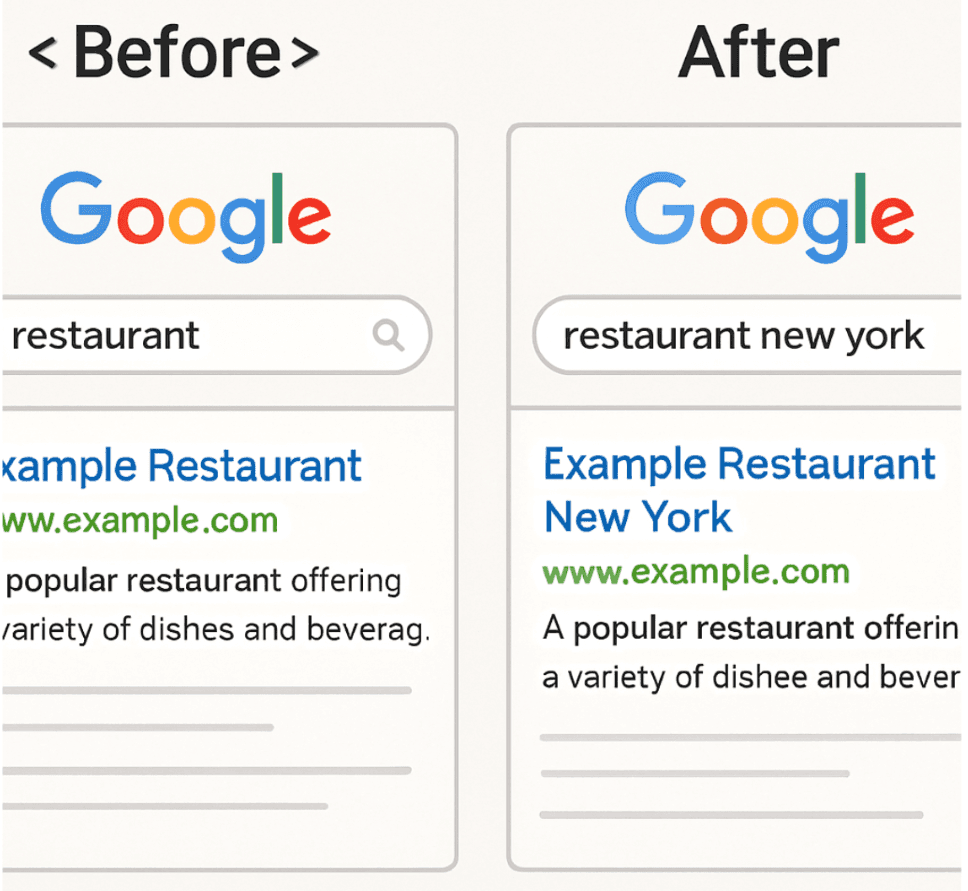
Instead of packing in terms, modern search engines reward natural language title tag optimization. This simply means writing your title the same way you would speak to a customer walking through your front door. To ensure your main service isn't missed, you should rely on front-loading primary keywords for relevance. By placing your most important subject at the very beginning of the title, you instantly catch a scrolling reader's eye in under one second while still sounding completely conversational.
Consider how this balance works for a local bakery trying to attract morning commuters:
- Don't (Stuffed): Best Bakery, Buy Bread, Bread Shop, Bakery Near Me
- Do (Natural): Fresh Artisan Bread: The Best Morning Bakery in Seattle
Once you stop writing for machines, you can focus on the people actually buying from you by aligning your titles with their specific search intent. Для помощи с генерацией SEO-заголовков, вы можете воспользоваться нашим генератором SEO заголовков.
Reading the Searcher's Mind: Aligning Titles with Real Search Intent
Imagine clicking a link for a quick recipe, only to find a sprawling essay about flour. You probably hit the back button immediately. This sudden exit happens constantly when websites ignore the relationship between bounce rate and misleading titles. If your title promises a fast answer but delivers a sales pitch, visitors leave instantly, which tells search engines your page wasn't helpful.
Earning trust requires clear alignment between search intent and titles. Search intent simply means understanding the real goal behind your customer's search. Are they looking to learn, or are they ready to buy? A vague title like "Plumbing Repair" fails to answer the who, what, or why. Instead, a title structured to answer a specific problem, like "How to Fix a Leaky Pipe," perfectly matches a researcher's needs.
To capture people who are actively ready to purchase, start using modifiers for long-tail search. Modifiers are descriptive add-on words like "affordable," "emergency," or "same-day." These create long-tail keywords, which are simply longer, highly specific phrases shoppers type when they know exactly what they want. Adding these focused words filters out casual window shoppers and directly attracts customers who need your specific service right now.
Highly accurate titles ensure every click brings a truly interested visitor. Once you understand the psychology behind matching customer queries, you can apply these principles directly to selling physical goods and perfect your product titles for e-commerce.
The Shopify Stumble: Perfecting Product Titles for E-commerce Success
Running an online store brings a unique set of challenges, especially when your internal inventory lists clash with how real people shop. Many beginners accidentally use internal tracking codes, called SKUs (Stock Keeping Units), as their public-facing names, leaving searchers staring at confusing labels like "TSH-BLU-M." To optimize your SEO Title Generator, you must translate those internal codes into natural, descriptive language that a customer would actually type into a search bar.
To stand out in a crowded digital shopping aisle, you need a highly specific naming formula. A proven strategy involves strategic brand placement in page titles, which simply means putting the descriptive words first and saving your company name for the very end. Use this checklist for a perfect product title:
- Product: Start with exactly what the item is (e.g., "Crewneck T-Shirt").
- Color/Size: Add the specific variation (e.g., "Navy Blue, Medium").
- Material: Include key details shoppers care about (e.g., "100% Organic").
- Brand: Finish with your business name (e.g., "- Sunset Apparel").
Following this precise structure naturally prevents duplicate titles across different variations of the same item. Search engines get confused when multiple pages share the exact same name, often choosing to hide them entirely. Rescuing these hidden pages requires eliminating duplicate content traps and fixing missing labels.
The Invisible Page: Fixing Missing Titles and Duplicate Content Traps
Leaving a web page without a name is like opening a storefront with a blank sign above the door. When search engines find a blank space, they guess what your page is about, which rarely helps you connect with the right customers. Knowing how to fix missing meta titles starts with a basic meta title audit. Free tools like Google Search Console can effortlessly scan your site and flag any pages missing these crucial digital signs.
Copying the exact same name across multiple pages creates a frustrating problem called keyword cannibalization. Imagine having three store aisles all labeled "Shoes"—customers wouldn't know where the winter boots are compared to the sneakers. Search engines struggle similarly, and the negative impact of duplicate titles on ranking occurs because your own pages compete against each other, often causing Google to hide them all from the search results.
Solving these invisible errors requires a reliable formula, especially when creating unique titles for large websites with hundreds of pages. Using a spreadsheet template that combines your specific service, local city, and a unique page detail naturally prevents accidental overlaps. Once every page has a distinct identity, you can focus on making those names irresistible to shoppers using strategic brand placement and emotional modifiers.
The Click-Me Factor: Boosting CTR with Brand Placement and Modifiers
Getting your website to appear in search results is only half the battle; the real goal is getting people to actually visit. This is measured by your Click-Through Rate (CTR), or the percentage of searchers who see your link and click it. Think of the search page as a crowded store shelf, where improving organic CTR with compelling headlines is like having the most attractive packaging.
One of the most effective tools for grabbing attention is using "Power Words." When someone is skimming generic links, these emotional hooks make your page the obvious choice to click. Try adding terms like:
- Proven: Builds immediate trust.
- Simple: Appeals to readers wanting easy solutions.
- Updated: Shows your information is fresh.
- Free: Removes the financial risk of clicking.
Finally, consider strategic brand placement in page titles by adding your company name at the very end, separated by a vertical bar (|) or a dash (-). This builds authority without wasting the crucial front space that hooks your reader. Taking back control of your search snippet means addressing the core reasons why search engines might override your optimized headline.
Why Google Rewrites Your Title: Taking Back Control of Your Search Snippet
It is frustrating to see search engines display a completely different headline than the one you crafted. The main reason why Google rewrites search titles is a lack of alignment between your headline and your actual website text. If your title promises a "Definitive Guide to Plumbing" but the page only lists business hours, the search engine steps in to fix this disconnect for the reader.
Taking back search snippet control means proving your digital signpost perfectly matches your storefront. Achieve this by focusing strictly on title tag accuracy, ensuring your headline honestly reflects your page content without stuffed keywords. Once you match titles to exactly what users will find, a quick audit can turn previous mistakes into immediate ranking opportunities.
Your 10-Minute Title Audit: Turning Mistakes into Ranking Opportunities
You no longer have to guess why your website feels invisible. By avoiding these common SEO title mistakes, you can finally polish the sign above your digital storefront. Start by executing a 10-minute SEO audit on your five most important pages to transform them into high-performing search assets. Use this title optimization checklist to prioritize what to fix first:
- Length: Is it under 60 characters so nothing gets cut off?
- Intent: Does it answer the searcher's actual question?
- Keywords: Are your most important words placed near the front?
- Brand: Is your business name neatly included at the end?
- Uniqueness: Is this title entirely different from your other pages?
Try updating just one title today and notice how your search visibility improves. You now understand how to clearly communicate your value to real people, turning everyday links into irresistible invitations. To further optimize your headlines, check out our SEO Title Generator.
Generate Perfect SEO Titles in Seconds
Stop guessing and start ranking. Our SEO Title Generator instantly creates click-worthy, keyword-optimized titles tailored to your topic — no copywriting degree required.
- Left-loaded keywords for maximum search visibility
- Power words baked in for higher click-through rates
- Character count validation so you never get truncated