
I build an actionable website optimization plan whenever an established property hits a growth plateau. In this guide, you will learn how to systematically audit technical bottlenecks, streamline conversion paths, and sequence engineering sprints over a six-week cycle using W3C Web Performance Standards. All you need is access to your analytics and crawler logs.
▶ Related Video
SEO in 2025: How I'd Learn it if I Were Starting Over
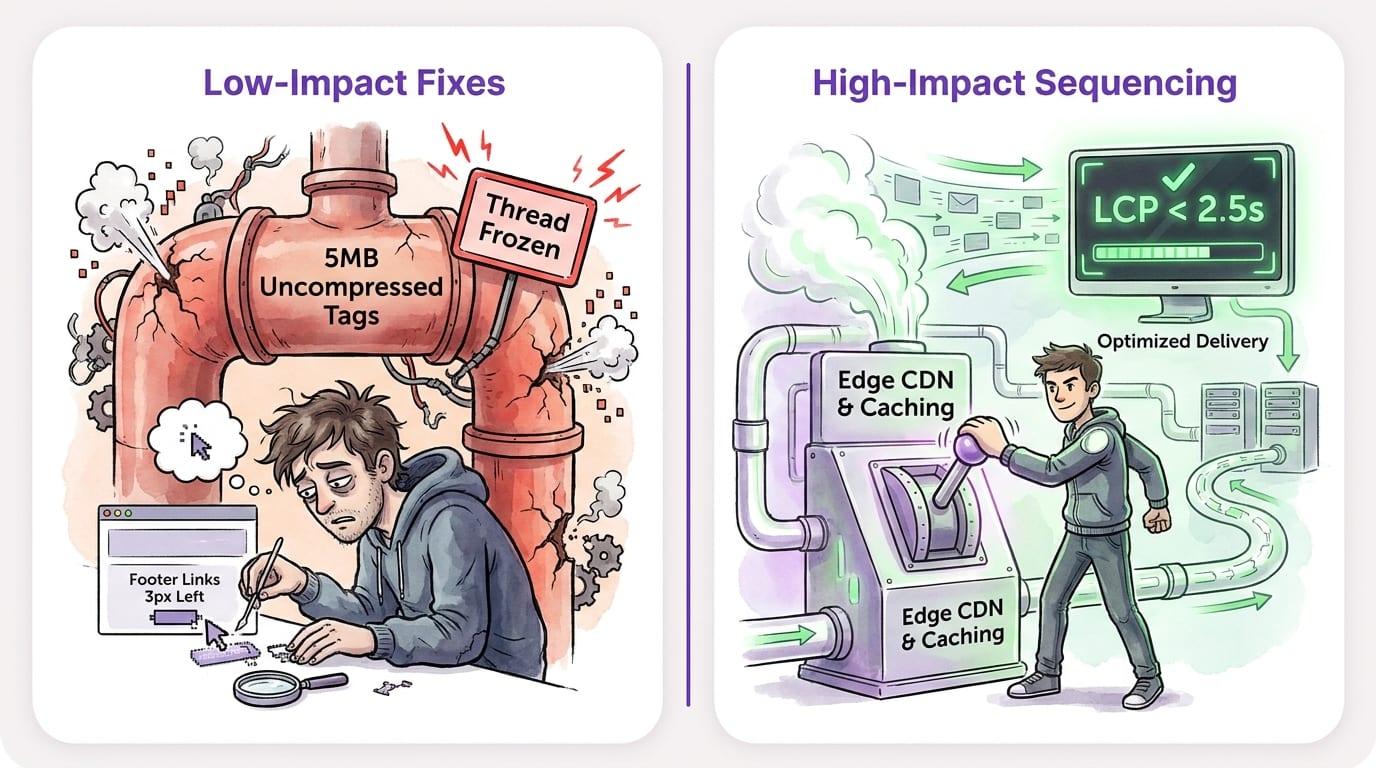
Too many teams burn engineering sprints moving buttons three pixels to the left while unoptimized scripts freeze mobile viewports. Optimization is not visual design. It is a systematic diagnostic process that strips away friction across your entire technology stack.
| Optimization Phase | Primary Focus | Core Metric / Target | Typical Cadence |
|---|---|---|---|
| Phase 1: Technical & SEO Audit | Crawl health, redirects, status codes | 0 critical 5xx/4xx errors | Weeks 1–2 |
| Phase 2: Performance & Speed | Server TTFB, Core Web Vitals, asset payload | LCP < 2.5s, INP < 200ms | Weeks 3–4 |
| Phase 3: UX & Conversion Paths | Form friction, mobile tap targets, checkout funnels | +15% macro-conversion rate | Weeks 4–5 |
| Phase 4: Monitoring & Iteration | Automated regression testing, bi-weekly crawl checks | Sustained indexation & uptime | Ongoing / Bi-weekly |
Key Takeaways
- Audit before patching. Never touch production templates without establishing server-level and conversion baselines.
- Protect Core Web Vitals. Keeping Largest Contentful Paint under 2.5 seconds directly safeguards search rank and user retention.
- Prioritize by impact. Use an effort-versus-impact matrix to eliminate high-friction technical debt within the initial sprints.
- Isolate test variables. Running concurrent layout changes makes it impossible to identify which tweak moved your conversion rate.
- Audit crawl budgets monthly. Purging orphaned pages and redirect chains frees Googlebot to index revenue-driving URLs.
Establish Benchmarks with a Comprehensive Site Audit
You cannot optimize what you have not rigorously measured against clean baseline data. Before changing a single line of CSS or tweaking server configurations, you need an exact snapshot of how real users and search engine bots currently interact with your pages.
In my experience, teams rush into redesigns based on executive hunches instead of raw server logs, which almost always tanks organic visibility. When you bypass the diagnostic phase, you end up resolving minor cosmetic issues while fatal database latencies and crawl traps remain completely untouched.
A proper audit inspects three layers: server infrastructure, frontend rendering speed, and search indexing status. Run your domain through Google Search Console documentation guidelines to inspect indexing errors, coverage gaps, and mobile crawl anomalies.
I start by running diagnostic scans on key URL templates: the homepage, primary service pages, and conversion funnels. If you run a commerce platform, align this with an ecommerce website seo plan to ensure dynamic product catalogs do not overwhelm your crawl capacity.
- Collect real-user monitoring data. Pull field metrics from the Chrome UX Report rather than relying purely on isolated synthetic lab runs.
- Review server log files. Identify HTTP 5xx server errors, redirect loops, and search bot crawl frequency across high-priority landing pages.
- Audit organic indexing health. Check Google Search Console for canonical tag conflicts, soft 404 responses, and orphaned pages lacking inbound internal links.
- Benchmark conversion funnels. Document drop-off percentages across checkout stages, signup flows, and lead capture forms before touching layout code.
Watch out for the first trap here: Mistake 1: Treating desktop and mobile performance as equivalent. Mobile users experience real-world CPU throttling and erratic radio network connections that desktop fiber connections never reveal.
Audit the Four Core Pillars of Website Performance
A complete optimization roadmap balances four interlocked areas: site speed, technical SEO, mobile user experience, and conversion paths. Neglecting any one of these pillars cripples the performance of the other three.
My stance is clear: speed and technical hygiene must precede conversion rate experiments every single time. A beautifully persuasive landing page will fail if third-party tracking scripts delay page rendering by four seconds and drive users away.
Start with Core Web Vitals. Google measures real-world user happiness through three specific thresholds defined on web.dev: Largest Contentful Paint (LCP), Interaction to Next Paint (INP), and Cumulative Layout Shift (CLS).
- Largest Contentful Paint (LCP). Ensure the main visual block renders within 2.5 seconds of the initial request.
- Interaction to Next Paint (INP). Keep user interaction delays under 200 milliseconds by deferring heavy JavaScript execution.
- Cumulative Layout Shift (CLS). Maintain a layout shift score below 0.1 by reserving explicit width and height dimensions for media elements.
Next, tackle technical SEO. Search bots consume finite computing budgets when crawling your website. Broken redirects, duplicate URLs generated by faceted navigation, and missing robots.txt directives waste that crawling quota. Follow proven methods on how to get your website on google search first page to secure technical visibility.
Mobile user experience requires fluid responsiveness, not just CSS shrink-wrapping. Viewports must adapt without horizontal overflow, form inputs need appropriate virtual keyboards, and interactive elements must provide at least 48x48 pixel touch targets.
Finally, evaluate conversion pathways. Remove friction points such as redundant form fields, ambiguous calls to action, and slow checkout scripts. Reviewing a structured conversion optimization plan helps pinpoint where user intent collapses into abandoned sessions.
Assemble Your Optimization Tooling and Analytics Stack
Executing an optimization roadmap requires a lean stack covering crawling, real-user monitoring, heatmapping, and search performance. You do not need dozens of subscriptions, but you do need tools that produce actionable technical diagnostics.
I prefer raw log files and native browser devtools over expensive all-in-one marketing suites that add their own client-side JavaScript bloat. Every additional monitoring script you inject into the `` tag exacts a measurable performance penalty on your visitors.
For technical site auditing, Screaming Frog SEO Spider remains the industry benchmark. It crawls internal link hierarchies, uncovers redirect chains, identifies duplicate title tags, and flags missing image attributes across hundreds of thousands of URLs.
To uncover behavioral bottlenecks, deploy visual diagnostic platforms like Hotjar. Session recordings and heatmaps show precisely where users experience rage clicks, stall on broken scripts, or abandon complex checkout forms.
- Crawling and Architecture: Screaming Frog SEO Spider or Sitebulb for deep status code verification and link equity mapping.
- Core Web Vitals and Speed: Google PageSpeed Insights, Chrome DevTools Performance panel, and WebPageTest for packet waterfalls.
- Search Diagnostics: Google Search Console for crawl stats, sitemap indexing, and search query impressions.
- Behavioral Analytics: Hotjar or Microsoft Clarity for session replays and scroll depth tracking.
Define Measurable KPIs and Baseline Milestones
Tie every technical sprint directly to measurable business outcomes rather than vanity traffic metrics. If a developer cuts server response time in half, that technical achievement must correlate with improved session duration, lower bounce rates, or higher lead generation.
Rank tracking alone is a deceptive north-star metric; I judge an optimization cycle on qualified pipeline and bounce-adjusted engagement time. Keyword ranks fluctuate constantly based on geographic personalization and SERP layout changes, while on-page user engagement remains entirely within your control.
Establish clear numerical targets inside your Google Analytics 4 documentation reports before initiating frontend refactoring. Compare progress against 30-day historical medians to smooth out normal weekend and seasonal traffic dips.
- Time to First Byte (TTFB): Under 200 milliseconds for cached assets, under 800 milliseconds for dynamic server requests.
- Interaction to Next Paint (INP): Below 200 milliseconds at the 75th percentile of mobile sessions.
- Crawl Efficiency: Zero unintended 301 redirect chains and fewer than 0.5% 5xx server errors during search engine passes.
- Conversion Funnel Velocity: A measurable decrease in checkout abandonment rate alongside a 10% to 20% increase in form submissions.
Sequence High-Impact Fixes Using an Effort Matrix
Plot every audit finding on an impact-versus-effort matrix to prevent technical debt from stalling your commercial goals. When faced with three hundred audit warnings, sequencing determines whether your project succeeds or runs out of developer budget.
I always tackle database query latency and caching headers first; they deliver immediate gains across all downstream user touchpoints. A single Redis caching layer or CDN rule can shave seconds off every template on your site simultaneously.
Watch out for the second critical pitfall: Mistake 2: Attempting to patch fifty low-priority styling glitches while ignoring critical JavaScript execution bottlenecks. Reordering footer links will never compensate for five megabytes of uncompressed marketing tags locking the main browser thread.
Implement browser and edge caching headers compliant with MDN Web Docs on HTTP Caching before rebuilding template layouts. If your site structure needs deeper configuration, consult our documentation on progseo website settings for baseline technical setup guidelines.
- Sprint 1 (Quick Wins - Days 1–10): Enable Gzip/Brotli compression, deploy HTTP/2 or HTTP/3, configure edge CDN caching, and fix critical 4xx/5xx crawl errors.
- Sprint 2 (Asset Optimization - Days 11–20): Convert raster imagery to WebP or AVIF, defer non-critical third-party JavaScript, and preload key hero fonts.
- Sprint 3 (DOM & Template Cleanliness - Days 21–30): Remove unused CSS, flatten oversized HTML DOM trees, and correct responsive mobile viewports.
- Sprint 4 (Conversion & Journey UX - Days 31–42): Streamline form inputs, resolve layout shifts on buttons, and optimize high-traffic call-to-action pathways.
Establish a Continuous Iteration and Testing Cadence
Optimization is a continuous operational discipline, not a one-and-done quarterly cleanup. Without persistent guardrails, team members will upload four-megabyte PNG files, marketing will inject unvetted tracking pixels, and software dependencies will slowly degrade your performance scores.
Quarterly audits are useless if code deployments occur daily; you need automated performance budgets in your CI/CD pipeline. Configure Lighthouse CI documentation workflows to block pull requests whenever a build causes Core Web Vitals regressions.
When introducing brand-new domains or re-architecting older architectures, pair your ongoing maintenance with a tailored seo plan for new website to ensure structural indexing holds firm over every production deploy.
- Weekly Crawl Audits: Run automated delta scans to catch newly broken links, missing canonical tags, or accidental `noindex` directives.
- Bi-Weekly Conversion Checkups: Review funnel drop-offs and checkout completion metrics to detect form validation errors or gateway bugs.
- Monthly Script Audits: Review Google Tag Manager containers and remove obsolete tracking snippets that add unnecessary network overhead.
- Quarterly Infrastructure Reviews: Re-evaluate database indexing, server hosting capacity, and edge caching rules to maintain low latency.
To automate routine search footprint growth alongside your manual technical maintenance, ProgSEO programmatically creates and manages structured, high-ranking pages based on your internal database. This allows engineering teams to focus on technical core stability while search visibility scales continuously.
Technical and performance optimizations often produce measurable speed gains within hours of deployment. However, search engines take anywhere from two to eight weeks to re-crawl updated URLs and reflect improvements in organic rankings. Conversion rate enhancements usually show statistically significant trends within two to four weeks depending on your traffic volume.
Technical optimization focuses on server response times, asset delivery, mobile rendering, and search bot crawlability. Conversion rate optimization (CRO) focuses on user psychology, page messaging, visual hierarchy, and friction reduction to turn existing visitors into paying customers. Both must work in concert for sustained business growth.
Run automated technical crawl scans weekly to detect broken links and indexing regressions. Execute an exhaustive full-site performance and UX review once every quarter to evaluate Core Web Vitals, prune obsolete third-party tracking tags, and refine high-converting user pathways.
Yes. Google uses Core Web Vitals as a confirmed ranking signal. While high-quality content and backlink authority remain primary drivers, a sluggish website with poor Largest Contentful Paint or excessive layout shift will lose search positions to faster, more stable competing pages.
Sources & References
- W3C Web Performance Working Group — Official specifications for browser navigation timing, resource loading, and client performance APIs.
- Google Search Console Documentation — Search indexing, URL inspection guidelines, and search engine crawl troubleshooting.
- Chrome UX Report (CrUX) — Real-world user measurement dataset tracking Core Web Vitals across millions of origins.
- web.dev Core Web Vitals Guide — Google's official thresholds and technical optimization methods for LCP, INP, and CLS.
- Screaming Frog SEO Spider — Website crawler documentation for site architecture, canonical verification, and link audits.
- Hotjar Behavioral Analytics — Official platform for user heatmapping, session replay analysis, and funnel diagnostics.
- Google Analytics 4 Help Center — Event tracking configurations, user path analysis, and funnel conversion measurement.
- MDN Web Docs: HTTP Caching — Mozilla developer documentation covering Cache-Control headers, ETags, and edge validation.
- Lighthouse CI GitHub Repository — Automated performance testing and regression detection workflows for continuous integration.