
When search marketers look for an ahref keyword planner, they are almost always searching for Keywords Explorer, the dedicated keyword discovery engine developed by Ahrefs. Ahrefs does not market a tool called "Keyword Planner"—that label belongs to Google's ad platform—but Keywords Explorer serves as its modern, organic-first counterpart. I rely on it to model real traffic, evaluate page-one competitiveness, and map content clusters.
▶ Related Video
Keyword Research Tutorial for Google and AI SEO
Key Takeaways
- Keywords Explorer replaces planners. Ahrefs names its keyword intelligence tool Keywords Explorer, delivering organic-focused clickstream and SERP data.
- Traffic Potential beats Volume. Assessing total potential visits to the top-ranking page prevents you from targeting misleading single-query volume spikes.
- Keyword Difficulty measures links. The KD metric strictly models how many unique referring domains you need to break onto Google page one.
- Parent Topics stop cannibalization. Grouping related queries beneath automated Parent Topics keeps you from publishing competing duplicate content.
- Google Keyword Planner prioritizes PPC. Google clusters keyword variants for ad buyers, whereas Ahrefs splits distinct search intent for organic rankings.
What Ahrefs Keywords Explorer Actually Is
Ahrefs Keywords Explorer is an organic search intelligence platform that blends raw Google search behavior with aggregated clickstream data to report exact user demand across multiple global search engines. In my opinion, traditional SEOs crippled their content calendars for years by blindly trusting advertising-focused search planners rather than real user behavior.
Unlike standalone tools that query a single API, this database indexes billions of search queries across ten distinct platforms. While Google commands most attention, you can pivot keyword research across alternative search ecosystems where customer intent differs dramatically.
When comparing broader software suites in our Moz vs Semrush vs Ahrefs breakdown, the strength of Keywords Explorer rests in how accurately it models post-search activity. It answers whether searchers actually click results or abandon the query when an instant answer resolves their question.
- Google Database: Analyzes billions of search queries across 200+ countries with granular search volumes.
- Alternative Search Engines: Tracks query intent across YouTube, Amazon, Bing, Yahoo, and Yandex, as detailed on Search Engine Land.
- Clickstream Modeling: Cleans bot anomalies to estimate real human clicks rather than raw automated query pings.
- Historical SERP Snapshots: Preserves historical ranking movements so you can spot SERP volatility across months.
- Multi-Keyword Processing: Lets you paste up to 10,000 seed terms at once for rapid bulk evaluation.
Four Core Metrics Every SEO Must Decode
To prioritize organic content effectively, you must master four primary metrics in Keywords Explorer: Search Volume, Traffic Potential, Keyword Difficulty (KD), and Clicks Per Search (CPS). In my view, Keyword Difficulty is the most misunderstood metric in modern search optimization because practitioners forget it calculates backlink volume, not content quality.
The Keyword Difficulty score ranges on a logarithmic scale from 0 to 100. It calculates the estimated number of referring domains pointing to the current top 10 search results. A KD score of 20 might demand 20 to 30 backlinks, while a KD score above 70 routinely requires hundreds of referring domains, according to Ahrefs' ranking studies.
Here is a common mistake I watch teams repeat: they filter their ideas strictly by high monthly Search Volume and ignore Traffic Potential. Search volume tracks queries for that singular phrase. Traffic Potential, however, tallies the total organic traffic that the current number-one ranking page collects from every keyword variation it ranks for.
| Ahrefs Metric | Calculation Basis | Practical SEO Value | Common Analytical Pitfall |
|---|---|---|---|
| Search Volume | 12-month average of individual query volume | Measures standalone market interest for a specific phrasing | Ignores whether one single page can rank for dozens of related phrases |
| Traffic Potential (TP) | Aggregated organic traffic to the current #1 URL | Reflects the true traffic ceiling for a well-optimized article | Can be inflated if the top result ranks for an unintended broad query |
| Keyword Difficulty (KD) | Logarithmic calculation of referring domains in top 10 | Benchmarks the minimum external link authority required | Does not account for on-page depth, internal links, or brand moat |
| Clicks & CPS | Ratio of search queries resulting in organic clicks | Identifies zero-click SERPs dominated by instant answer boxes | Mistaking high volume for high traffic on queries resolved by AI |
Factoring in Clicks Per Search prevents you from writing content for zero-click queries. Research documented by SparkToro highlights how search engines increasingly answer navigational and factual questions directly on the results page. If a term has 10,000 searches but a CPS of 0.35, most searchers leave without clicking an organic result.
- Audit the CPS ratio: Target terms where the Clicks metric closely mirrors or exceeds total search volume.
- Reference the Parent Topic: Always check whether Google maps the keyword to a higher-volume parent theme.
- Evaluate SERP Features: Identify whether ads, video carousels, or AI Overviews push organic results below the fold.
- Inspect Historical Volume Trends: Look for seasonal drops or sudden spikes that distort annual search averages.
Unearthing High-Intent Keyword Reports
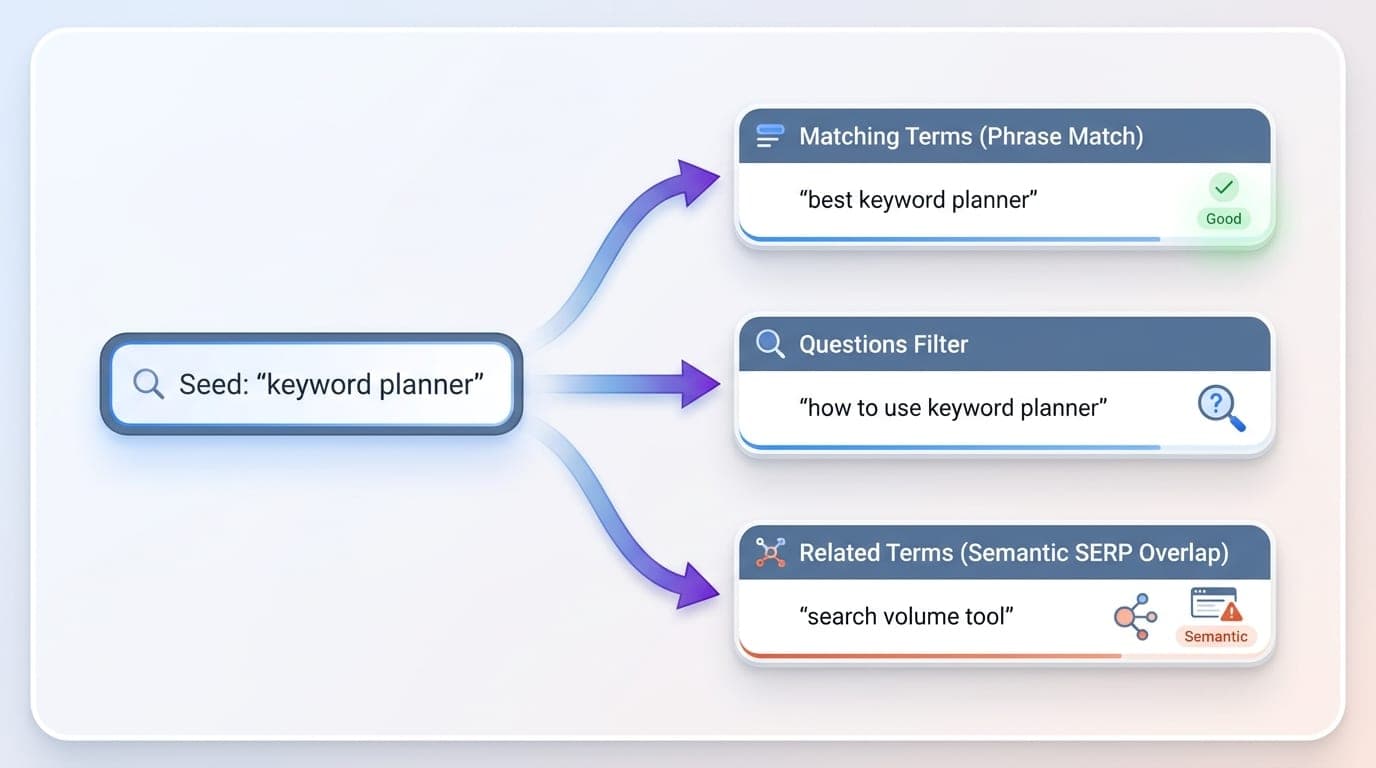
The fastest path to generating editorial ideas in Keywords Explorer is toggling between the Matching terms, Related terms, and Search suggestions reports under the keyword ideas sidebar. I believe the Matching terms report with the "Questions" filter active is the single most productive goldmine for informational content discovery.
When you enter a broad seed phrase, the Matching terms report surfaces every phrase containing your target terms. Switching between "Phrase match" (which maintains your exact word order) and "Terms match" (which finds combinations in any order) allows you to discover natural language variants that rigid match types miss.

The Related terms report expands beyond your literal seeds. It evaluates the top 10 ranking pages for your seed term, identifies what other queries those specific URLs rank for, and extracts shared themes. This mimics Google's semantic indexing model described in the Google Search Central documentation.
- Questions filter: Isolates queries beginning with how, what, where, or why for practical troubleshooting guides.
- Volume and KD thresholds: Set a minimum search volume alongside a realistic maximum KD score to weed out vanity terms.
- Word count filter: Set minimum word count to 4 or higher to instantly isolate long-tail, conversion-focused phrases.
- Include / Exclude operators: Strip out competitor brands or irrelevant modifier words using the "Exclude" input bar.
Ahrefs Keywords Explorer vs Google Keyword Planner
Google Keyword Planner was engineered to help media buyers construct paid search campaigns, whereas Ahrefs Keywords Explorer is built specifically for organic content strategists. My take is that relying on Google Keyword Planner for an editorial SEO roadmap is like trying to navigate a mountain hiking trail with an aviation map.
As we explored in our deep-dive on using Google Keyword Planner for SEO, Google groups similar search terms into combined volume buckets. If two terms share roughly similar intent, Google Ads aggregates their volume under one umbrella number to streamline advertising ad groups.
Ahrefs preserves distinct volumes for nuanced search queries. Furthermore, Google Keyword Planner does not show organic competitive metrics, referring domain requirements, or organic click-through distributions. While Google Ads relies on automated bid strategies like Target CPA or Maximize Clicks to capture search traffic, organic search requires ranking based on page relevance and authority.
If you look at search engine market data from Statcounter, Google maintains the lion's share of desktop search, making accurate organic data indispensable. For advertisers testing multi-engine setups, our analysis of the Microsoft Keyword Planner details how Bing handles PPC query data differently.
| Feature | Ahrefs Keywords Explorer | Google Keyword Planner |
|---|---|---|
| Primary Objective | Organic SEO keyword discovery and competitive research | Paid search ad group planning and PPC campaign forecasting |
| Search Volume Precision | Specific monthly estimates derived from clickstream modeling | Bucketed search ranges unless actively maintaining high ad spend |
| Competition Metric | Keyword Difficulty (KD) based on page-one referring domains | Competition index based on advertiser density and bidding volume |
| SERP & Intent Analysis | Full SERP overview showing current ranking URLs, DR, and traffic | No SERP breakdown, organic positions, or domain ratings displayed |
Step-by-Step Keyword Planning Workflow
A reliable keyword research process requires moving from raw seed concepts to filtered clusters, followed by manual SERP verification before scheduling production. In my experience, building keyword lists without assigning clear intent clusters right inside your workflow is a guaranteed recipe for costly content debt.
A second major mistake I see teams make constantly is fragmenting closely related search queries across several different pages. When you write separate articles for three minor phrasing variations, you trigger keyword cannibalization, splitting your organic ranking signals and confusing Google's crawler.
You can also extract proven topics by entering a rival domain into Ahrefs Site Explorer to inspect their top-performing pages. Once your seed list is established, execute this sequential workflow inside Keywords Explorer:
- Input 5 to 10 Seed Keywords: Paste your core product categories or service themes into the seed bar and select your target country.
- Apply Difficulty and Word Count Filters: Narrow down the Matching terms report by setting maximum KD according to your current domain strength.
- Cluster by Parent Topic: Review the Parent Topic column to merge secondary phrases beneath one primary, comprehensive content asset.
- Inspect the SERP Overview: Open the SERP dropdown to check if the top 5 ranking URLs are dominated by massive institutional authorities or dedicated niche guides.
When inspecting the SERP overview inside Ahrefs, pay close attention to the Domain Rating (DR) and URL Rating (UR) of the ranking pages. If sites with low DR sit comfortably in the top five positions with few backlinks, you have identified a content gap where comprehensive analysis can outrank legacy brands.
Evaluating Free Ahrefs Tools and Limitations
Ahrefs provides a lightweight, public Keyword Generator on their website that requires no account, but it operates with severe analytical limitations. My stance is simple: the free generator is fine for a fast sanity check on a client call, but attempting to scale an editorial calendar without full SERP metrics is a false economy.
The free tool truncates keyword ideas to 100 suggestions, locks historical search volume trends, and conceals the SERP overview entirely. Most importantly, it completely hides Traffic Potential, meaning you cannot assess whether a low-volume keyword actually commands thousands of incidental visits.
- 100-Keyword Display Cap: Results stop after the first 100 rows, cutting off long-tail query discovery.
- Zero SERP Overviews: You cannot inspect the current page-one ranking URLs, backlink profiles, or domain ratings.
- No Traffic Potential Data: Hides aggregated traffic ceilings, forcing you to guess based on single-phrase volume alone.
- No Bulk Analysis: The free interface disallows uploading multi-seed lists or exporting CSV data for spreadsheet clustering.
Pricing for Ahrefs plans depends on your workspace credit consumption, data retention needs, and user seats. Rather than guessing historical plan boundaries, review the latest tier structures directly on the Ahrefs pricing page to match your workflow requirements.
For organizations scaling catalog or content footprints, evaluating automated production alternatives like our analysis of ProgSEO vs Ahrefs for SaaS content generation demonstrates how technical teams connect keyword data directly to scalable template generation.
When managing dozens of keyword clusters at once, automating landing page production bridges the gap between research and deployment. In our workflow, pairing structured data with ProgSEO turns raw keyword lists into search-optimized programmatic pages without manual content bottlenecks.
No, Ahrefs names its keyword research tool Keywords Explorer. Google owns the trademark and tool known as Google Keyword Planner, which is designed primarily for PPC advertising.
Search volume measures queries for a single phrase, whereas Traffic Potential calculates the total traffic won by the top-ranking page across all the long-tail keywords it ranks for simultaneously.
Ahrefs calculates Keyword Difficulty on a logarithmic scale from 0 to 100 based entirely on the estimated number of unique referring domains pointing to the current top 10 ranking search results.
Ahrefs offers a free standalone Keyword Generator on its site, but it caps suggestions at 100 phrases, excludes Traffic Potential, and does not provide SERP overviews or bulk upload capabilities.
Sources & References
- Ahrefs — official SEO platform, database documentation, and Keyword Difficulty calculation methodology.
- Wikipedia: Clickstream — technical background on clickstream aggregation and web usage data analysis.
- Search Engine Land — coverage of multi-platform search engine trends and keyword intelligence reporting.
- SparkToro — original research on search behavior trends and zero-click query distribution.
- Google Search Central — official guidelines on search indexing, query intent, and ranking systems.
- Statcounter Global Stats — desktop and mobile search engine market share distribution tracking.
- Google Ads Help — primary documentation on Google Keyword Planner features, ad grouping, and PPC search estimates.
- Moz — educational resource explaining keyword cannibalization and internal search competition.