
If you need an automated, model-bound metadata pipeline, `ralphjsmit/laravel-seo` is the best laravel seo package available today. For teams that prefer manually orchestrating tags through controllers and Blade templates, `artesaos/seotools` remains the most battle-tested alternative. Neither handles crawling, so you will still pair your choice with `spatie/laravel-sitemap` for XML feeds.
▶ Related Video
Best web hosting 2026 | Top 5 hosting providers tested and compared!
Over the past decade managing enterprise Laravel stacks, I have watched developers alternate between over-engineering custom metadata helpers and wrestling with abandoned packages. The right package saves hundreds of controller lines while guaranteeing valid HTML output for search bots.
Key Takeaways
- Eloquent automation wins. Binding SEO metadata directly to models via traits drastically cuts repetitive controller boilerplate across content-heavy sites.
- Facades offer granular overrides. Controller-based packages excel when handling atypical routes, multi-step checkout flows, or landing pages without dedicated database records.
- Sitemaps require separate tooling. Dedicated sitemap packages outperform all-in-one SEO suites because crawler generation needs disk caching and memory optimization.
- Structured data prevents drift. Schema engines that compile JSON-LD from Eloquent attributes prevent breaking structured data during UI redesigns.
- SPA head rendering differs. Inertia.js applications should pass package-generated meta arrays via Inertia page props rather than echoing Blade directives.
Core Capabilities Every Laravel SEO Tool Must Provide
A production-grade SEO package must handle title tags, Open Graph cards, canonical URLs, and structured JSON-LD schemas out of the box without polluting your templates. If a package requires you to hand-write raw HTML tags in your master layout, it fails its primary purpose.
- Title & description management: Automatic truncation, fallbacks, and sitewide delimiter formatting.
- Social media protocols: First-class support for the Open Graph protocol and Twitter Card tags.
- Canonical normalization: Enforcing clean URLs to prevent duplicate content penalties from tracking query parameters.
- Structured data schemas: Compliant JSON-LD structured data generation for articles, breadcrumbs, and products.
- Robots indexing controls: Route-level rules for `noindex`, `nofollow`, and archive directives.
In my opinion, building custom meta helpers inside `app/helpers.php` is the most common technical debt trap teams fall into. It starts innocent with a simple title function, and eighteen months later you have an untestable, 600-line procedural spaghetti file.
Here is the first major mistake I see teams make: they hardcode social fallbacks into their main layout. When a dynamic page misses an image or excerpt, search crawlers encounter broken attributes or conflicting tags that dilute page relevance.
- Missing Open Graph image tags: Scrapers fall back to random layout assets or navigation logos.
- Duplicate canonical declarations: Search engines discard conflicting canonical tags entirely.
- Malformed schema syntax: Unescaped strings inside Blade script tags invalidate your rich snippets.
- Trailing slash inconsistencies: Mismatched canonicals create indexation splits across your domain.
Laravel SEO Packages at a Glance: 2026 Comparison
Pick your package based on whether your metadata lives inside database records or route controllers. Combining tools that serve different parts of the request lifecycle keeps your application maintainable and prevents redundant queries.
| Package | Primary Approach | JSON-LD Schema | Open Graph / Twitter | Best Architectural Fit |
|---|---|---|---|---|
| ralphjsmit/laravel-seo | Eloquent Model Traits | Deep native support | Automated from model data | Publishing platforms, blogs, SaaS |
| artesaos/seotools | Controller Facades | Basic JSON-LD builders | Manual facade injection | Marketing sites, custom app flows |
| spatie/laravel-sitemap | Crawler & Model Crawls | N/A (Sitemaps only) | N/A (Sitemaps only) | All Laravel production applications |
I consider all-in-one packages that attempt to bundle web crawlers, asset minification, and database indexing together an antipattern in modern PHP. Modularity allows you to upgrade framework versions cleanly without waiting on a monolithic package maintainer.
Deep Dive: ralphjsmit/laravel-seo for Eloquent-Driven Apps
`ralphjsmit/laravel-seo` is designed for applications where database entities directly drive public pages. By linking SEO attributes to Eloquent ORM models via polymorphic relationships, it removes metadata configuration entirely from your HTTP controllers.
- Target Audience: Teams building content-heavy portals, SaaS directories, and publication engines.
- Architecture: Model-bound polymorphic tables with custom migrations and automatic fallback cascades.
- Key Strengths: Automatic BreadcrumbList schema, Article metadata, and fine-grained Open Graph tags.
- Limitations & Exclusions: Overkill for micro-services or static marketing sites without database-backed pages.
I prefer this package when building content architectures because it standardizes SEO data storage. Rather than scattering columns across your `posts`, `categories`, and `products` tables, it stores all metadata in a dedicated `seo` table linked by morphs.
php
use RalphJSmit\Laravel\SEO\Support\HasSEO;
use RalphJSmit\Laravel\SEO\Support\SEOData;
use Illuminate\Database\Eloquent\Model;

class Article extends Model
{
    use HasSEO;

    public function getDynamicSEOData(): SEOData
    {
        return new SEOData(
            title: $this->title,
            description: $this->excerpt,
            author: $this->author->name,
            image: $this->featured_image_url,
            published_time: $this->published_at,
        );
    }
}
In your Blade template, a single directive renders every standard meta tag, Twitter card, and schema block automatically:
html
<head>
    {!! seo($article ?? null) !!}
</head>
Deep Dive: artesaos/seotools for Controller-Level Control
`artesaos/seotools` is the longest-standing metadata management package in the Laravel ecosystem. It operates through static facades that you call directly inside controller methods or middleware before returning a view.
- Target Audience: Developers maintaining legacy codebases, bespoke route pipelines, or brochure sites.
- Architecture: Service provider registered facades (`SEO`, `SEOMeta`, `OpenGraph`, `TwitterCard`, `JsonLd`).
- Key Strengths: Zero database requirements, lightweight memory footprint, and explicit controller overrides.
- Limitations & Exclusions: Cumbersome for large catalogs where defining tags in every action creates boilerplate.
Historically, keeping up with core Laravel releases was an issue with this repository. For example, the illuminate/support requirement for v0.16.0 was `5.8.*|^6.0` according to artesaos/seotools issue #209 (checked as of October 2026). Recent releases have improved stability across modern framework versions.
php
use Artesaos\SEOTools\Facades\SEOMeta;
use Artesaos\SEOTools\Facades\OpenGraph;

class PricingController extends Controller
{
    public function index()
    {
        SEOMeta::setTitle('Enterprise Pricing & Plans');
        SEOMeta::setDescription('Flexible billing options for scaling engineering teams.');
        SEOMeta::setCanonical(url('/pricing'));

        OpenGraph::setTitle('Enterprise Pricing & Plans');
        OpenGraph::setUrl(url('/pricing'));
        OpenGraph::addProperty('type', 'website');

        return view('pricing.index');
    }
}
In my experience, teams that don't enforce strict view models end up bloating controllers with repetitive `SEOMeta` calls across 50 methods. If you choose Artesaos, wrap its calls inside dedicated action classes to prevent your controllers from swelling.
XML Sitemaps: Why Spatie Still Owns Crawler Generation
Neither `artesaos/seotools` nor `ralphjsmit/laravel-seo` handles XML sitemaps, making `spatie/laravel-sitemap` the standard companion. Building XML feeds requires distinct computational constraints: disk writes, URL filtering, and memory streaming.
- Target Audience: Every production Laravel app needing search engine discovery compliant with Google's sitemap protocol.
- Architecture: Concurrent crawler engine built on Guzzle, paired with manual stream builders.
- Key Strengths: Handles multi-index sitemaps, media tags, lastmod timestamps, and frequency tags.
- Limitations & Exclusions: Unsuitable for real-time web execution on sites with more than 5,000 URLs.
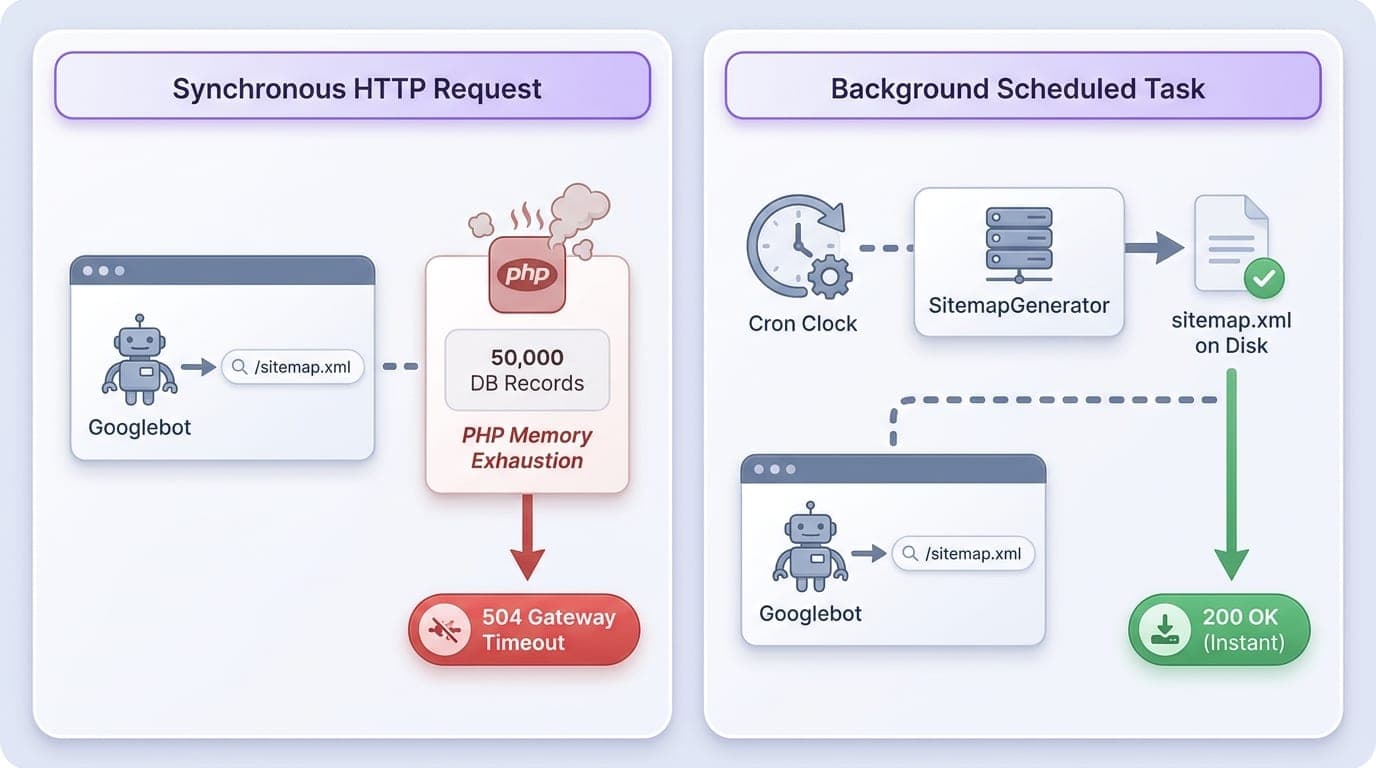
Here is the second major mistake teams make: generating sitemaps synchronously during live HTTP requests. When Googlebot requests `/sitemap.xml`, running a live database query across 50,000 records will exhaust PHP worker memory and cause gateway timeouts.
- PHP memory exhaustion: Buffering massive XML trees in memory crashes standard FPM workers.
- Search engine crawl timeouts: Crawlers abandon index requests that take longer than 10 seconds.
- Database query locking: Full table scans on production databases degrade customer checkout flows.
- Uncached duplicate requests: Concurrent bots trigger redundant generation processes simultaneously.
I never let web requests generate sitemaps on the fly; scheduling background crawls via `SitemapGenerator` avoids unexpected memory spikes. According to Spatie's official documentation, you can automate generation in a console command:
php
use Spatie\Sitemap\SitemapGenerator;
use Illuminate\Console\Command;

class GenerateSitemapCommand extends Command
{
    protected $signature = 'sitemap:generate';

    public function handle(): void
    {
        SitemapGenerator::create(config('app.url'))
            ->maxTagsPerSitemap(20000)
            ->writeToFile(public_path('sitemap.xml'));
    }
}
How to Choose the Right Package for Your Architecture
Your choice depends on how much of your page content stems from Eloquent models versus unique route workflows. Choosing the wrong paradigm means writing custom glue code that defeats the purpose of installing a package in the first place.
| Project Type | Recommended Package Setup | Primary Technical Justification |
|---|---|---|
| Content CMS or Blog | ralphjsmit/laravel-seo + spatie/laravel-sitemap | Model-bound schema eliminates duplicate field mapping in views. |
| E-Commerce Storefront | Hybrid (Ralph for products, Artesaos for filters) | Allows model-driven product schema alongside dynamic query tag overrides. |
| SaaS App with Public Marketing | artesaos/seotools + spatie/laravel-sitemap | Marketing routes change frequently and rarely map directly to single models. |
If you build on Inertia.js, pass your server-compiled SEO data as page props and bind them using the `` component rather than relying on server-side Blade directives.
Keep in mind that on-page tags cannot fix slow Time to First Byte or render-blocking scripts, which require dedicated caching and asset bundling optimization.
Setting up your metadata architecture is only the baseline step for search visibility. Establishing a routine SEO maintenance package ensures that 404 redirects, canonical tags, and schema drift are audited systematically as your codebase expands.
- Assess data sources: Choose `ralphjsmit` if 80%+ of pages represent database entities.
- Audit team workflows: Choose `artesaos` if marketing engineers need direct controller control.
- Always decouple sitemaps: Use `spatie/laravel-sitemap` as an isolated queue job or cron task.
- Test structured data: Validate your generated markup against the W3C validator and Google's Rich Results Test.
When scaling thousands of programmatic landing pages, manual tag management becomes unsustainable. ProgSEO automates the generation and continuous updating of SEO pages directly from your website data.
Yes. They handle completely different responsibilities without conflict. Artesaos injects HTML head tags for individual HTTP requests, while Spatie generates static XML files on disk for search engine discovery.
Yes. It automatically compiles BreadcrumbList, WebPage, and Article schemas based on your model attributes and relationship hierarchy, outputting them in a clean JSON-LD script block.
Always pass the full URL including page parameters (e.g., `request()->url() . '?page=' . $page`) to your package's canonical setter, or set the canonical URL to the primary parent category to consolidate indexing signals.
Executing sitemap generation during an HTTP request ties up server workers, risks timeout errors, and strains database capacity. Instead, run sitemap tasks via the Laravel console scheduler in the background.
Sources & References
- Laravel Documentation — official documentation covering Blade layouts, Eloquent ORM, and framework routing
- Open Graph Protocol — standard specifications for open graph metadata across social platforms
- Schema.org — core schemas and syntax rules for JSON-LD structured data formats
- Packagist — PHP package archive providing version histories and dependency metadata
- GitHub Issue #209 — dependency constraints for artesaos/seotools versions
- Spatie Laravel Sitemap Docs — official usage instructions and crawler configuration parameters for Spatie packages
- Google Search Central — search engine crawler guidelines and XML sitemap specifications
- W3C Validation — web standards testing tools for HTML and structured schema verification







